
Duty and rest limits
What this does
Turns the Duty & Rest card into something you can act on: what each row counts, which regulation it came from, and the four things it doesn’t check.
Before you start
- An FAA, EASA or UK CAA authority is active (→ G7). With no authority at all there’s no Duty & Rest card on the dashboard.
- You log duty times on your flights: Report (Duty Start), Release (Duty End), Rest Before (hrs), Sectors and the Augmented crew switch, in the entry form’s Duty & Rest section (→ C1). A flight without them still counts toward the two flight-time rows, which use block time, not duty.
- You’re on the crew list of your flights. A flight counts as yours only when your own Directory entry is on its crew list — Crew → Add Crew Member → Add Me (from Profile) (→ C1). Currency counts the same way (→ G5).
- Nothing in this guide is Pro-only.
Steps
- On the dashboard, find the card headed Duty & Rest. It sits between
Currency Status and Flight Activity
(→ A12).
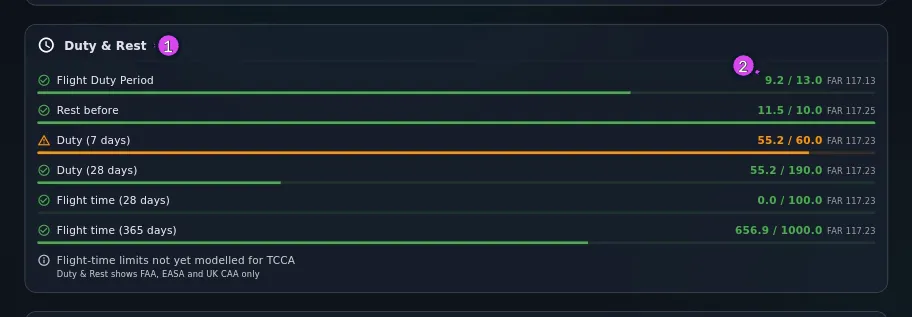
1 the card title2 a row's used / limit - Find one limit row. Left to right: a status icon, the row’s name,
used / limitin your Time Format, and the regulation in small grey type —FAR 117.13,ORO.FTL.210. The bar underneath shows the same fraction. - Check the two rows for your last duty period, if they appear: Flight Duty Period — how long it ran, against the maximum for your report time and number of sectors — and Rest before, the rest you recorded before it, against the minimum. Both look at your most recent duty period only.
- Scroll to the cumulative rows, which count back from today: duty over 7
days and 28 days under the FAA, duty over 7, 14 and 28 days
under EASA or the UK CAA, then flight time over 28 days and over a year in both.
EASA and the UK CAA add one more: flight time in the calendar year.
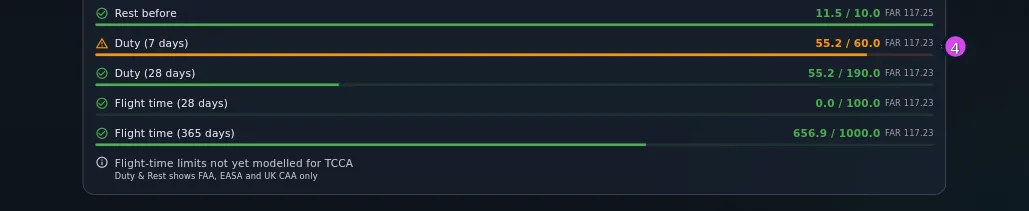
4 a cumulative row - If both an FAA and an EASA or UK CAA authority are active, use the citation
to tell the two sets of rows apart — the names repeat. EASA and the UK CAA
share one set: the UK’s flight-time limitations are the same text, so with
both on you see the
ORO.FTLrows once.
How to tell it worked
You can point at any row and say what it counts, over what window, how much room is left, and whether its number comes from duty times or block time.
If something goes wrong
| What you see | Why | What to do |
|---|---|---|
| No Duty & Rest card anywhere on the dashboard | No authority is active at all, so the card is hidden, not empty | Turn one on (→ G6). If you fly GA with no authority on, no card is expected |
| Flight-time limits not yet modelled for TCCA, over Duty & Rest shows FAA, EASA and UK CAA only — one row and no gauges | Only the FAA, EASA and UK CAA limits are built. TCCA, CASA and CAANZ each get this row, one per authority | Nothing to do in the app. Read it as “not checked”, never as “within limits” |
Every row reads 0:00 / its limit, and you have flown | You aren’t on the crew list of any flight in the window, or the flights are drafts. After an import this is the usual cause: a CSV only puts you on the crew list where one of its crew-name columns held your own name and matched your entry (→ B3) | Put yourself on the crew list of the flights that count (→ C1). A draft is not a duty period and not flight time (→ C3) |
| No Flight Duty Period row, though the rest of the card is there | Your most recent duty period has no Release (Duty End), or it’s marked Augmented crew — the app doesn’t have the augmented limits, so it shows no maximum | Fill in Release if the period has ended. If it’s augmented, this row won’t appear — see Gotchas below |
| No Rest before row | The most recent duty period has no Rest Before (hrs) value. It’s optional, and the app won’t work it out from the gap between two duties | Type it on the flight that began that duty |
| A duty period you logged isn’t in the cumulative totals | A period only counts once it has both Report and Release. An open period adds nothing, and neither does a draft | Fill in Release |
| Flight time here doesn’t match your logbook total | This counts block time on flights where you’re crew, leaving out simulator sessions, drafts and anything outside the window. Your logbook total counts everything | Neither is wrong. Compare like with like — a 28-day window against a 28-day filter (→ D4) |
| A row is amber and you’re nowhere near the limit | Amber starts at 90% of the limit. It isn’t a margin you can set | Nothing. Go by the number beside it |
Reference: the limits this card checks
| Row | What it sums | FAA | EASA and UK CAA |
|---|---|---|---|
| Flight Duty Period | Your most recent duty period, Report to Release | The maximum for your report time and sector count, from the unaugmented acclimated table — between 9:00 and 14:00 · FAR 117.13 | The basic maximum for your report time, less 30 minutes per sector beyond the second, never below 9:00 — between 9:00 and 13:00 · ORO.FTL.205 |
| Rest before | The Rest Before (hrs) you recorded on that same period | At least 10:00 · FAR 117.25 | At least 12:00 · ORO.FTL.235 |
| Duty (7 days) | Completed duty periods that began in the last 7 days | 60:00 · FAR 117.23 | 60:00 · ORO.FTL.210 |
| Duty (14 days) | The same over 14 days | — | 110:00 · ORO.FTL.210 |
| Duty (28 days) | The same over 28 days | 190:00 · FAR 117.23 | 190:00 · ORO.FTL.210 |
| Flight time (28 days) | Block time on your flights in the last 28 days | 100:00 · FAR 117.23 | 100:00 · ORO.FTL.210 |
| Flight time (calendar year) | Block time since 1 January | — | 900:00 · ORO.FTL.210 |
| Flight time (365 days) / (12 months) | The same over the last 365 days | 1000:00 · FAR 117.23 | 1000:00 · ORO.FTL.210 |
The limits are written here in hours and minutes. The card writes them in your
Time Format, so a decimal setting shows the 28-day duty limit as 190.0 rather
than 190:00
(→ J3).
Green with a tick: under 90% of the limit. Amber with a warning triangle: at or past 90%. Red with an exclamation mark: past it. A rest row works the other way round, because falling below the minimum is the breach: it’s amber within the first hour above the minimum, and red below it.
Gotchas
An augmented duty period gets no Flight Duty Period row, but still counts in every cumulative row. The app doesn’t have the augmented tables — FAA Table C, EASA’s augmentation provisions — so it doesn’t check a maximum for that period. Its hours are still in Duty (7 days) and the other cumulative rows. So an augmented duty is only half-checked, and nothing on the card says the other half is missing. Check the cumulative rows, and work out the FDP yourself.
The Acclimatised switch changes nothing on this card. Both tables the app has are the acclimatised ones; the reductions for when you aren’t acclimatised aren’t built in. The switch records the fact for your own records and for an export, but it doesn’t shorten a maximum. So if you weren’t acclimatised, the FDP row is showing a more generous limit than your real one.
Only your most recent duty period is checked. Not the worst in the window, not each one in turn — the latest, by Report time. A period three days ago that ran past its maximum isn’t flagged anywhere once a newer one exists. Only the cumulative rows look back.
An open duty period counts for nothing. Until Release (Duty End) is filled in, the period adds zero hours to every cumulative row. So the card reads low exactly when you most need it accurate: mid-tour, with today’s duty still open.
Simulator sessions, drafts and opening balances are all left out. A simulator session is not flight time anywhere in the app (→ E4), and a draft isn’t a finished entry yet. A carry-forward opening balance — your earlier hours brought in as one total — has no crew list, so it can’t count as yours here (→ B7). If you brought an airline career in as an opening balance, the yearly flight-time row starts from zero — which is right for a limit about the last 365 days.
Nothing here warns you. Like the currency card, this is a display you have to come and open. There’s no notification, no badge and no email anywhere in the app, so a row goes red without telling anybody (→ G8).
This is advisory, on the same terms as currency. It’s a reading of your own records against a transcription of two published rule sets. It isn’t your operator’s manual or a rostering system, and it has never seen your duty roster.