Read the currency card
What this does
Turns every number, word and colour on the Currency Status card into something you can act on.
Before you start
- The acknowledgement is given and at least one authority is on, or the card has nothing to show you (→ G6).
- You’ve read How currency is worked out here. The key point: each row is fed either by a document you filed or by flights you logged, and the card doesn’t tell you which. G5 also explains why a rule can be missing from the card altogether — for example because of its operation, the part of the regulations a flight was flown under (→ G7).
- If any medical row matters to you, set your date of birth first (→ A9). Without it, a row can read Expired on a certificate that still has months to run — see A medical row is only as good as your date of birth, below.
Steps
- On the dashboard, find the card headed Currency Status. The green badge
beside the title lists your active authorities, joined by
•.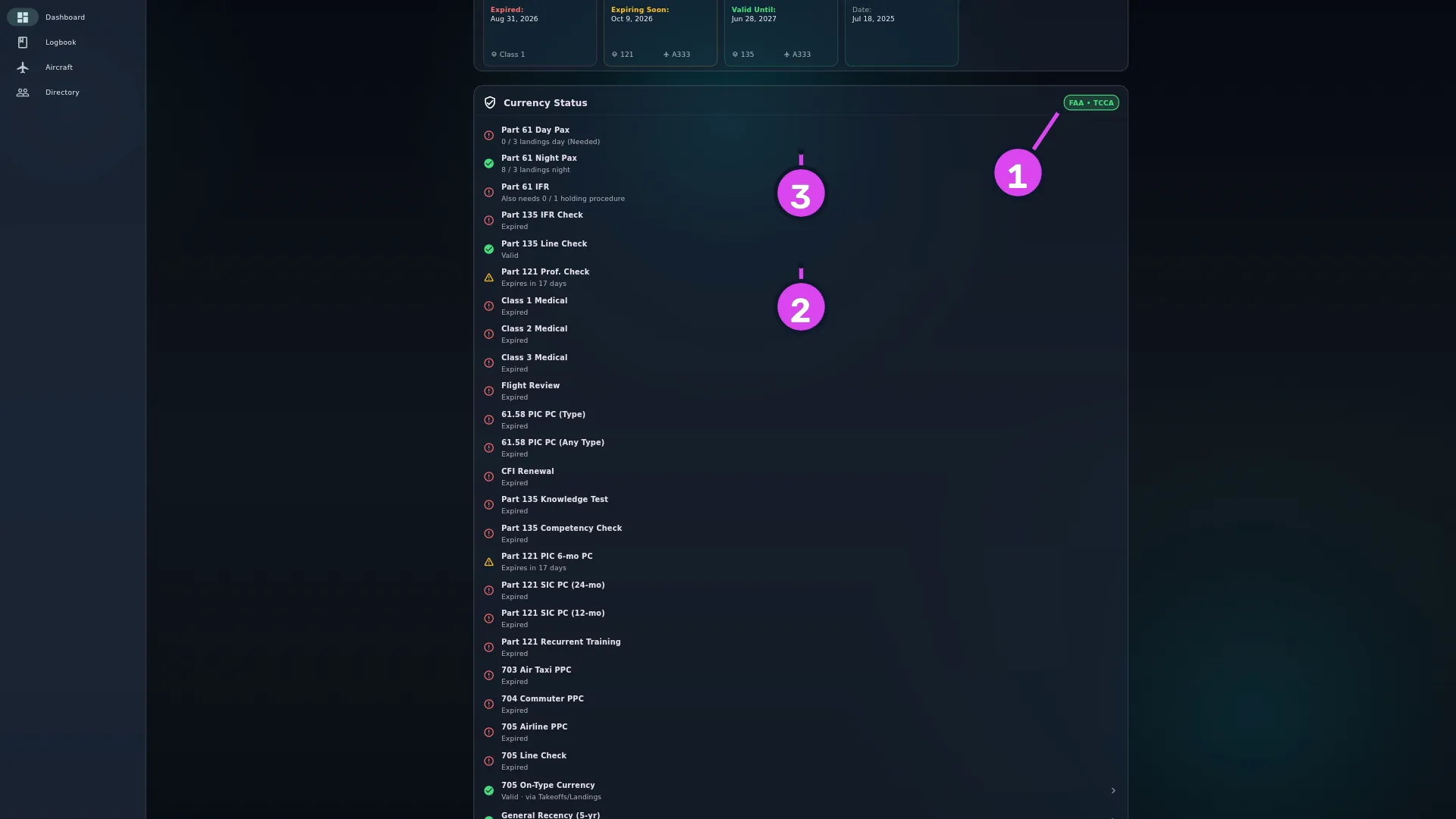
1 the badge listing your active authorities2 a document row — moved by filing a record3 a counting row — moved by flying - Find a document row: a name over
Valid,Expires in N daysorExpired. It’s fed by the Document Store, and you change it by filing a record (→ G2, G3). - Find a counting row: a name over something like
2 / 3 landings day, with(Needed)added when it isn’t met. It’s fed by your logged flights, and you change it by flying. - Tap the chevron on a row that reads
Valid · via …,Expires in N days · via …orNo leg currentto see its legs. The row is green if any one of its legs is current, and the text after via names the leg that’s doing it.
- Tap anywhere on the card to open Compliance Settings, where the rules behind these rows are switched on and off (→ G7).
How to tell it worked
You can point at any row and say what it wants, how close you are, and whether the fix is a document or a flight.
If something goes wrong
| What you see | Why | What to do |
|---|---|---|
| No active currency rules tracking. Tap or click to select an authority. | No authority is on | Turn one on (→ G6) |
| A row you expected is missing | Its authority is off, its operation reads Hidden — you don’t fly this, or its own switch is off | Work the three-cause check (→ G7). An absent row isn’t a passed row |
| A red row you’re sure you’ve satisfied with a document | The record’s subcategory isn’t exactly the one the rule looks for | Check it against the table in G2 |
| A grey row reading Not checked — … | The app couldn’t check that rule at all. The row ends with the reason: this rule’s definition is invalid, this kind of rule is not supported yet, this rule names no document type, or this rule could not be evaluated. The other rows are unaffected | Report it with your version (→ A11). Treat that requirement as untracked until it’s fixed — grey isn’t a pass |
| A group row reading Not checked — a leg of this rule could not be evaluated | No leg of an either / or rule passed, but at least one couldn’t be checked — so the app won’t say you’ve failed it | Tap the chevron to see which leg is grey, then as above |
| Syncing currency rules… | The rules haven’t finished loading into this logbook | Reopen the dashboard in a moment |
A row named like a stored value — DG_Training, Medical — BasicMed, whatever you typed | A dated document that no active rule reads gets a row of its own | See Rows whose name is not a rule, below |
| A red row sitting below a green one | Rows aren’t sorted by how urgent they are | Look down the whole card. There’s no sorting control |
Reading a status line
There are five shapes, and the shape tells you what kind of requirement it is:
| Status line | What it is |
|---|---|
Valid · Expires in N days · Expired | A document rule. The date is the content; fix it in the Document Store |
2 / 3 landings day | A counting rule against your flights. (Needed) is added when it’s not met. The unit is the app’s own field name, which is why it reads landings day rather than day landings |
4.5 / 6.0 instrument time (Needed) · Also needs 0 / 1 holding procedure | A counting rule with a sub-requirement. Also needs means the main count is already met and only the sub-requirement is outstanding; without it, both are short. Hours here follow your Time Format setting |
Valid · via Sectors · Expires in N days · via Sectors · No leg current | A rule the regulation joins with or — meet any one leg. Tap the chevron for the legs |
Not checked — … | A rule the app couldn’t check. Grey, with a question mark, and never red — see the table above for the four endings |
On a document row, any count you see is 1 / 1 and means nothing. The date is
all the information there is.
Red and grey mean different things: red is an answer, grey is the absence of one. Only red is telling you to go and do something about it.
The colours, exactly
Green with a tick: met. Amber with a warning triangle: met, but expiring within thirty days. Red with an outlined circle round an exclamation mark: not met. Grey with a question mark: not checked, with the reason in the row’s own text. The thirty days is fixed, not a setting.
Not every rule goes amber first. A counting rule only has an expiry date while it’s currently met, so a rule you’re failing shows red with no amber stage before it. Between two looks at the dashboard, a landing-currency row can go from green straight to red. A document row always has a date, so it always passes through amber — though that date is only as good as what the app had to work it out from (→ G5).
A landing row can read zero on a day you flew. Some rules count only the landings you flew — FAA 61.57(a) is one, because the regulation asks for the sole manipulator of the controls. On a flight with more than one pilot on the crew, the app credits a landing to you only when PF Landing is ticked on that flight’s Times step. If the box is left unticked, the landing goes to nobody: the app can’t tell that you landed.
So a row can read 0 / 3 landings day in the same week a type-recency rule
beside it reads 14 / 3 — they’re asking different questions. Tap the rule to
see how many landings were held back, and why. A single-pilot flight is never
affected: the box only matters when someone else could have been flying.
A medical row is only as good as your date of birth. If you left Valid Until (Optional) blank on the record, the expiry on this card was worked out from the rule’s validity period for your age on the day of the exam. With no date of birth on file the app can’t pick an age tier, so it uses the shortest one the rule has. For a TCCA Category 1, that’s three months against a possible twelve. The row is early rather than late, and the card won’t tell you that’s why.
Set the date (→ A9) or type the certificate’s own expiry into the record (→ G2). To see what the app would have used if it knew your age, open the rule: its Window chip shows the range and its Age tiers chip lists the tiers (→ G9).
Rows whose name is not a rule
Any document you gave a Valid Until date to, and that no active rule reads,
gets its own row at the bottom of the card. You can tell by the label: instead of
a rule’s name, it’s the event type exactly as stored, with the subcategory after
a dash if the record has one — DG_Training, Medical — BasicMed, or whatever
you typed into Custom event type. It reads Valid / Expires in N days /
Expired straight from the date you typed. That’s how a passport, a company ID,
a BasicMed or a custom event type can turn up on a compliance card. These rows
come after every rule row, sorted by expiry, soonest first.
The app decides which documents land here the same way the rules decide what they read — event type, subcategory, and authority where the rule has one. So a medical in a category no rule reads, or from an authority you haven’t switched on, shows up here instead of vanishing. What it can’t do is invent a date: a record with Valid Until blank and no rule to work one out appears on no row at all (→ G2).
What the card will never do
It won’t warn you, notify you or badge anything — there are no reminders anywhere in the app. It won’t tell a document rule from a flight rule. It won’t say which age tier a medical’s window came from, or that it fell back to the strictest one. And it says nothing at all about a requirement whose rule is switched off.
Nor does a colour on this card mean you’re legal. Each row is the shipped text of one rule read against your own logbook, as of the date that rule set was last reviewed — which is the limit the acknowledgement you gave is about (→ G7). The regulation you fly under decides whether you may fly; this card is a reading of your records against it.