
What Pro includes
In one line
Pro is a one-time purchase that unlocks five things in the app. The logbook itself, sync, backups and every export are free, and they stay free.
Why it works this way
Your logbook lives on your own devices and nowhere else, so there’s nothing to rent and nothing that stops working when a payment stops. Pro covers things built on top of the logbook: a typeset PDF, regulatory forms, machine reading of paper pages, reading times off a cockpit screen. The raw-data exports — CSV, TSV, the all-entities ZIP and Excel — are always free, so your logbook is never held hostage. Sync is free too: your flights travel device to device and never pass through a server of ours. Our server’s only part in a sync is issuing the certificates the two devices use to recognise each other.
Pro is bought once. There’s no expiry, no seat count, and no limit on how many devices it covers.
What this means for you
- Pro unlocks exactly five things. This table is the whole list.
| What Pro unlocks | What the free app does instead |
|---|---|
| Unlimited flight logging | Add Flight opens the Upgrade to Pro screen rather than the wizard, once 100 hours have been logged in the app (→ K2) |
| The print-ready PDF logbook | PDF can still be selected in the export panel, which shows PDF and regulatory exports are a Pro feature. CSV and Excel are always free — your data is yours to take any time. Tapping Export opens the upgrade screen (→ F1) |
| The FAA 8710-1 Section III export | The same as PDF: selectable, with the same notice, and the upgrade screen on Export (→ F5) |
| AI Scan — turning photographed paper pages into flights | The AI Scan button in the import wizard opens the upgrade screen (→ B8) |
| Capture from FMC in the flight wizard’s block-times row | The button opens the upgrade screen. It’s an iOS and Android feature only — on Windows, Linux and macOS the button isn’t there at all, with or without Pro (→ C7) |
-
Everything else in the app is free, without limits: importing CSV and Excel logbooks, exporting CSV, TSV, Excel and the all-entities ZIP, backup and restore, sync between your devices, the Document Store, currency tracking, the Hangar, the Directory, analytics and the Career Map. None of them ever asks about Pro. The sync screen’s banner says so: Cloud-less sync is fully unlocked! Consider upgrading to Pro to support the developer.
-
Pro comes with 10 AI Scan pages, once, ever. Not ten a month and not ten per logbook — ten when Pro is first activated on your account. Re-activating later doesn’t refill them. More pages are a separate purchase (→ K6).
-
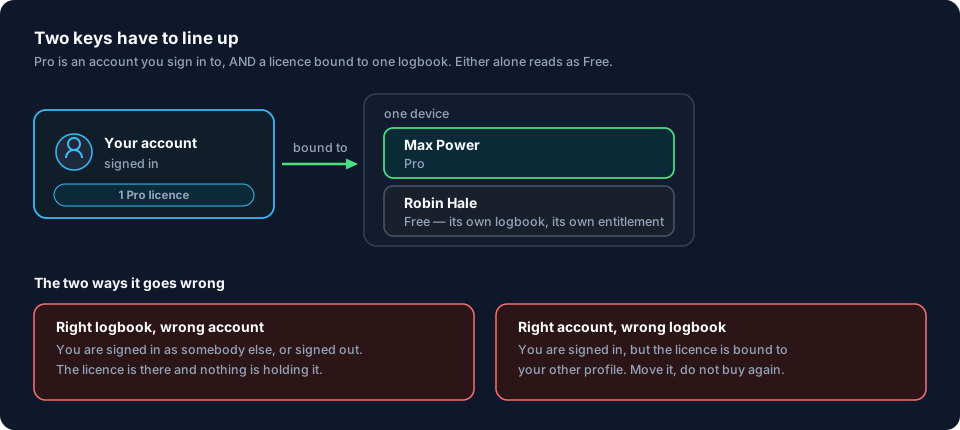
Two things have to line up: the account and the logbook. Pro is held by the Google or Apple account you signed in with, and it points at one logbook. (If the logbook didn’t reach the checkout, the licence isn’t pointed at one, and it covers every logbook on that account.) If the account is right and the logbook is wrong, the app shows Free, and you move the licence across (→ K5). If the account is wrong, moving does nothing: sign in with the account you bought with (→ K3).
-
It works offline. After the purchase, the app stores a signed licence file on the device and checks it there. You don’t need a connection to stay Pro, and an expired sign-in doesn’t take Pro away — the app says so: Your logbook and Pro status remain available offline. Signing in again is never the fix for Pro (→ K7).
-
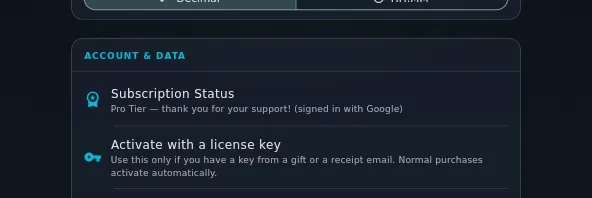
One place in the app names the two states. Profile Settings → ACCOUNT & DATA → Subscription Status, which reads Free Tier — checked your Google account or Pro Tier — thank you for your support! (signed in with Google).
-
The upgrade screen lists the same five things, in its own words: Unlimited flight logging · Print-ready PDF logbook (EASA FCL.050) · FAA 8710-1 & regulatory exports · AI Scan — digitize a paper logbook (10-page preview) · Capture block times from the FMC / ACARS (iOS & Android).
The common mistake
Reading “Every feature, no tiers” on the website’s purchase page as the free app has no limits.
It’s about tiers above Pro: there’s one Pro, it covers every platform, and nothing is held back for a higher price. The same page states the free-tier limit separately, in its own section beside the platform table. How that limit works — which hours count, what happens at 75 and at 100 — is the next guide.
Where to go next
- The one limit the free app has: The free 100-hour limit
- Buying: Upgrade to Pro
- You’ve got a code rather than a purchase: Redeem a license key
- You own Pro but this logbook says Free: Move Pro to another logbook
- More AI Scan pages: Buy AI Scan pages
- What the sign-in is for: Sign in, and what the account is for