
Redeem a license key
What this does
Turns a licence key into Pro on the logbook you’ve got open.
Before you start
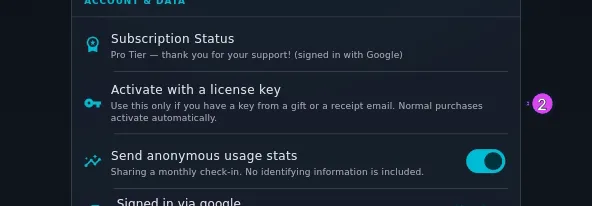
- You need a key. Ordinary purchases don’t produce one — they activate on their own. The row in the app says so: Use this only if you have a key from a gift or a receipt email. Normal purchases activate automatically. A third case the app doesn’t name: you bought on the web without signing in, and the success page showed you a key (→ K3).
- You have to be signed in, and the key is spent against that account. Profile Settings → ACCOUNT & DATA → Sign in with Google / Sign in with Apple (→ K7). Until you are, the row reads Sign in below before entering a license key. and tapping it does nothing else.
- Open the logbook you want Pro on first. Redeeming binds the licence to whichever logbook is open. You can move it afterwards (→ K5), but it’s less work to open the right one now.
- A key is used once, and one account holds one licence.
Steps
- On the dashboard, tap your own profile card to open Profile Settings, then scroll to ACCOUNT & DATA.
- Tap Activate with a license key.
- Type or paste the key into the field. A key looks like
AA-followed by four groups of five characters — for exampleAA-XXXXX-XXXXX-XXXXX-XXXXX, the same shape as the faint hint in the empty field. Case makes no difference: the field upper-cases what you type.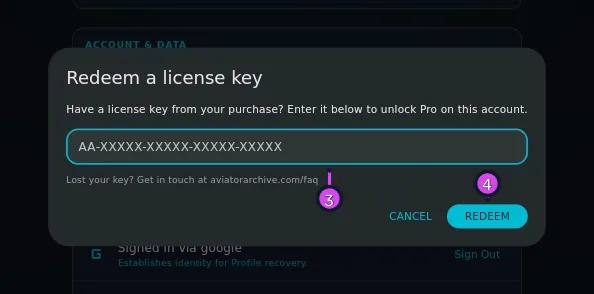
- Tap REDEEM.
How to tell it worked
The dialog closes and Subscription Status, in the same section, reads Pro Tier — thank you for your support! (signed in with Google), or Apple. The key is now spent against that account, and you won’t need it again — Pro is stored on the device as a signed licence, and works offline.
If something goes wrong
| What you see | Why | What to do |
|---|---|---|
| This key is already in use by another account. Sign in with that account to use it. | The key was redeemed under a different Google or Apple account | Sign out, sign in with that account, and look at Subscription Status. The key doesn’t need redeeming twice |
| You already have an active Pro license on this account. | Pro is already yours | That isn’t a failure. If this logbook still says Free, move Pro to it (K5) — you don’t need a second key |
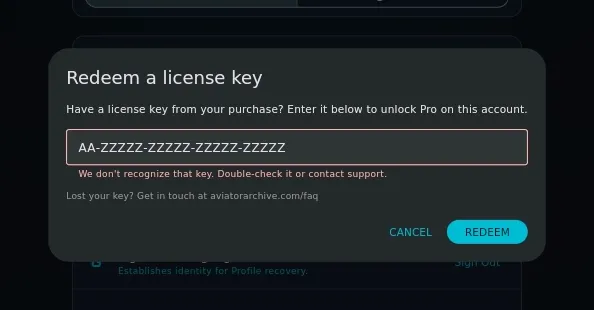
| We don’t recognize that key. Double-check it or contact support. | The key doesn’t exist as typed | Re-check every character against the AA- + four-groups-of-five shape. If it’s right, contact support |
| Couldn’t reach our servers. Try again later. | No connection, or the server is unreachable | Retry when you’ve got a connection. Redeeming needs one |
| Sign in first, then try again. | The dialog was opened while signed out | Sign in in the same section, then reopen the dialog |
| Could not read sign-in identity. | The app couldn’t read which account you’re signed in with | Sign out and back in, then retry |
Re-redeeming your own key is harmless
If you’re unsure whether a key went through, entering it again under the same account is safe. The server hands the licence back rather than refusing it, and puts things right if the app and the server disagreed. What it does not do is move Pro to a different logbook — that’s a separate control (→ K5).
If you have lost the key
The dialog says what to do: Lost your key? Get in touch at aviatorarchive.com/faq. Keys never expire, so one from months ago is still good. If it came from a logged-out web purchase and the success page has stopped showing it — that page only shows it for 72 hours — the key still exists, and support can find it.