
Layouts: what follows you and what does not
In one line
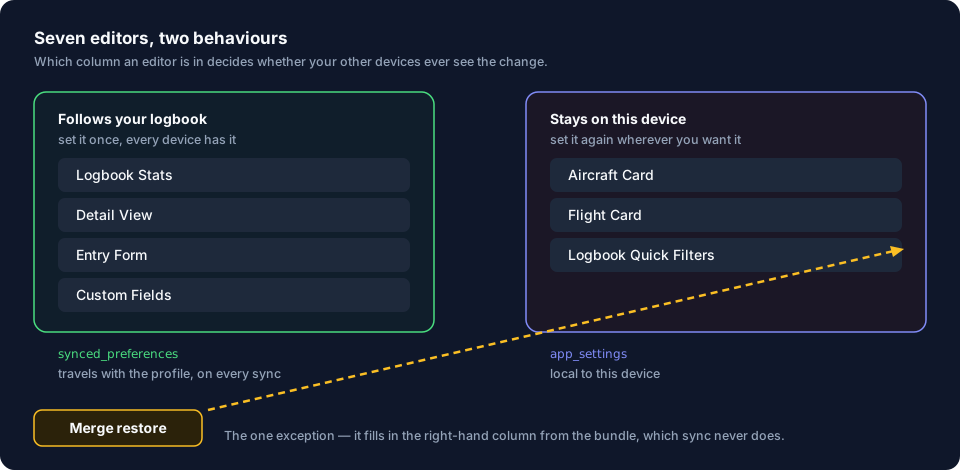
Seven screens in the app let you choose which fields they show, and not every one of those choices follows your logbook to your other devices.
Three of those choices follow your logbook to your other devices, three stay on the device where you made them, and the seventh travels because it’s part of your logbook rather than a setting — and nothing on any of the seven screens tells you which kind you’re looking at.
Why it works this way
A layout is a saved choice about which fields appear on one screen, and in what order. Three layouts are stored with your logbook and sync across devices the same way your flights do. The other three are stored in this device’s own settings, which don’t sync.
What this means for you
- Set up the ones that travel once. The Logbook Stats bar, the Detail View and the Entry Form are worth an evening, because you only spend that evening once for every device you own.
- Expect to set up the other three on each device. The Flight Card, the Aircraft Card and the Quick Filters have to be set up separately on the phone, the tablet and the laptop. A Merge restore is the one exception, and only where you haven’t already set one yourself (see The common mistake, below).
- A layout changes what’s shown and nothing else. No editor in this group changes a logged value, a total or an export. Hiding a field hides the field; the value stays on the flight.
- Every editor opens as a full-screen panel with a ✕. There’s no dimmed background to tap away — close it with the ✕ in its header.
- Every one of the seven has a Reset. It’s in the editor’s header, beside the ✕. Each one says exactly what it restores, and none of them touches a logged value.
- Custom Fields is the seventh tile, and it’s a different kind of thing. A custom field is part of your logbook, like an aircraft or an airport, not a preference. So its definition, its values, its order and its visibility all travel (→ J7).
Every preference, and where it’s kept
A setting can be kept in one of three places:
- With your logbook. It syncs to your other devices and survives every kind of restore.
- On this device. It takes no part in sync — but a Merge restore fills in thirteen of these settings, wherever this device has never set its own (see The common mistake, below).
- On the computer. It belongs to the machine rather than to any logbook, and isn’t in any backup at all.
| Editor / setting | Kept | Follows you |
|---|---|---|
| Logbook Stats bar | with your logbook | yes |
| Detail View — hidden fields, category order, field order | with your logbook | yes |
| Entry Form fields | with your logbook | yes |
| Filters and sort — logbook, airports, people, organizations, aircraft, types | with your logbook | yes |
| Flight Card | on this device | no by sync · a Merge restore fills it in if you have not set it here |
| Logbook View — Cards, Columns or Rows | on this device | no by sync · a Merge restore fills it in if you have not set it here |
| Aircraft Card | on this device | no by sync · a Merge restore fills it in if you have not set it here |
| Quick Filters | on this device | no by sync · a Merge restore fills it in if you have not set it here |
| Light/dark mode | on this device | no by sync · a Merge restore fills it in if you have not set it here |
| Time format | on this device | no by sync · a Merge restore fills it in if you have not set it here |
| Distance unit | on this device | no by sync · a Merge restore fills it in if you have not set it here |
| Animation duration | on this device | no by sync · a Merge restore fills it in if you have not set it here |
| Default airport countries | on this device | no by sync · a Merge restore fills it in if you have not set it here |
| Liveries and panel opacity | on this device, with a copy on the computer for the look before a profile opens | no by sync · a Merge restore fills it in if you have not set it here |
| Interface scale | on the computer — not in your logbook at all | no, and it isn’t in any backup |
Custom fields aren’t in this table because they aren’t preferences. They’re part of your logbook, and they sync like the rest of it.
Interface scale is the odd one out, and you can see it. Everything else in the “no by sync” half of the table is kept inside a logbook, so it’s in a backup, and a Merge restore fills it in on a device that never set it. Interface scale isn’t in the backup at all: it’s kept on the computer, because the app needs to know how big to draw the profile selector before it knows whose logbook it’s opening. No restore of any kind carries it.
Liveries are kept in both places: in your logbook, and on the computer as the look the app shows before a profile opens. That computer copy is never changed from inside a profile, so the shared screens never wear one profile’s colours (→ J1).
The common mistake
Spending an evening on the Flight Card on a desktop, then picking up the phone and finding the default three fields on every flight.
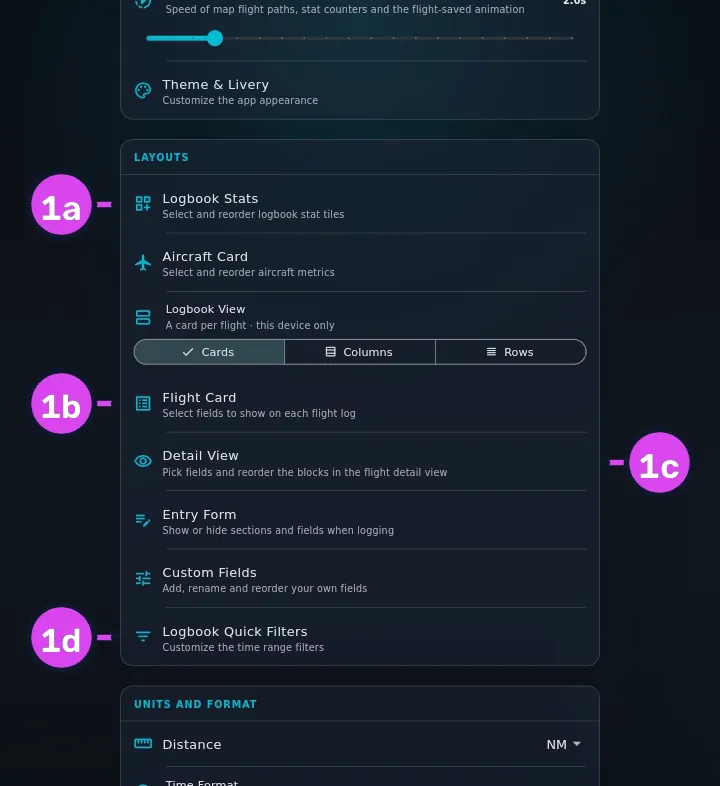
Nothing warns you. The seven tiles sit in one section of one screen and look identical, and so do the editors. There’s no error and no indicator — the phone shows the defaults, which looks like sync is broken at the exact moment it’s working correctly. The tell is that some of your work did arrive: if the stats bar is right and the flight cards aren’t, nothing is broken. You’re looking at the split.
The split has a second half, and it’s about restores. A Merge restore doesn’t erase the three layouts that don’t travel, or the theme, the livery, both opacities, the animation duration, the time format, the distance unit, the default airport countries and the logbook view. It fills each one in — but only where this device has no value of its own yet. A choice you’ve already made here is never overwritten; only a setting you’ve never touched arrives from the backup. A Replace restore is different: it copies the whole logbook file, so it applies every one of those settings regardless of what’s already here, including a few that only matter on this device and that a Merge leaves alone. Choose accordingly (→ H6).
Where to go next
The seven editors, each with the guide that covers it:
| Tile in LAYOUTS | Follows your logbook | Guide |
|---|---|---|
| Logbook Stats | yes | Customise the stats bar (→ Guide D2) |
| Detail View | yes | Detail view fields (→ J6) |
| Entry Form | yes | Entry form fields (→ J5) |
| Custom Fields | yes, as part of your logbook | Custom fields (→ J7) |
| Flight Card | no | Customise the flight card (→ Guide D3) |
| Aircraft Card | no | The Hangar (→ Area E) |
| Logbook Quick Filters | no | Quick filters (→ Guide D6) |
Logbook View, in the same section, isn’t an editor. It switches the logbook list between cards and two denser one-line views, and it stays on this device like the Flight Card whose fields those views show (→ See more flights at once: the dense views, Guide D11).
- What a restore keeps and what it drops: Restore from a backup (→ H6)
- Why devices share a logbook at all: One logbook, every device (→ A2)