
One logbook, every device
In one line
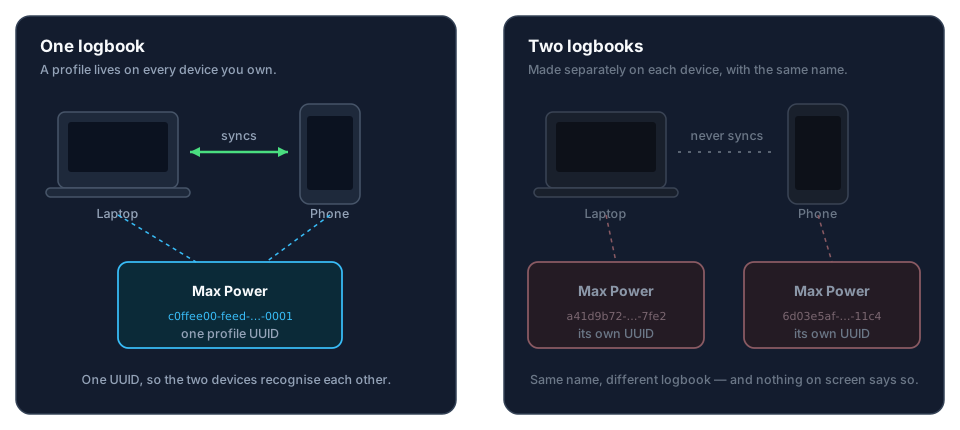
A profile is one logbook that lives on every device you own, so on a new device you send across the one you already have rather than making a second.
Why it works this way
Aviator Archive keeps your logbook on your devices and nowhere else. No server holds the real copy, so there’s nothing to subscribe to, nothing to lose access to, and nothing for anyone else to read. The cost is that your devices have to recognise each other directly. They do it by the profile’s own identity — a permanent marker written into the logbook the moment it’s created.
That marker is what sync matches on. It isn’t the name you typed.
What this means for you
- A profile is the logbook. Its own encrypted database, its own settings, its own aircraft and people. When you open a profile, you’re opening a logbook.
- The identity isn’t the name. Two profiles both called Max Power are two unrelated logbooks that happen to share a label, the way two notebooks on a desk can have the same word on the cover.
- Sync links the devices that share an identity. Devices that don’t never
appear in each other’s device list. If one is on the same network, the sync
screen says Found
, but it holds a different logbook instead of listing it. - Your account has one logbook. Signing in with Google or Apple links your account to the logbook you sign in on, and Pro belongs to that logbook. Sign in on a different logbook with the same account and the app tells you: This account already has a logbook, with the ways out (→ K7).
- On a second device, you send the profile across. Scan a QR code from the first device, or send it over the air (→ I2, I3). Either way the identity comes with it.
- Restoring a backup keeps the identity too. So restoring onto a new phone is a fair way to get your logbook onto it, and the restored device can then sync with the old one.
- Several profiles on one device is normal — and it’s a different thing entirely. A second pilot sharing the household tablet, or a logbook you want kept apart, each get their own profile. They don’t merge and they don’t sync to each other. Each pilot signs in with their own account, and each logbook syncs with its own pilot’s devices while it’s the one open on the tablet (→ I1).
The common mistake
Installing the app on a second device and creating a new profile there with the same name.
The app tries to catch it before it happens. New profile first asks Is this your first device with Aviator Archive?, and if your logbook is somewhere else, the answer takes you to Scan invite instead. If a second logbook gets made anyway, signing in on it with your account brings up This account already has a logbook, and the sync screen says the other device holds a different logbook. Both logbooks are working correctly. They aren’t the same logbook, and they never will be.
If you’ve already done it, nothing is lost. A second logbook with nothing in it can be deleted. One with flights in it gets combined into the first — everything moves across from a backup of it (→ H8) — and then you delete it and send the real one across.
Where to go next
- Setting up your first device: Create your profile
- Adding a second device: Move a profile to a new device (QR) and Move a profile over the air (→ I2, I3)
- A replacement device with a backup in hand: Import a profile from a backup (→ H7). That’s the one for a device with no logbook on it yet — Restore from a backup (→ H6) merges into or replaces a logbook you already have open, which a new device doesn’t have
- What sync actually does once devices are linked: How cloud-less sync works (→ I1)