
FAA 8710-1 Section III
What this does
Fills Section III — Record of Pilot Time — of FAA Form 8710-1, the Airman Certificate / Rating Application, from your logged hours.
It opens the filled form for you to check and correct cell by cell, and saves it as a PDF.
Before you start
- The FAA 8710-1 export is a Pro feature, as is the PDF logbook. The four data formats — CSV (logbook), TSV (logbook, tab-delimited), CSV (all entities, .zip) and Excel (.xlsx) — are free, forever. The free 100-hour limit caps what a logbook records, not what leaves it.
- This form is lifetime, always. The Date Range in the export panel doesn’t apply to it. Every flight you’ve logged is counted.
- The app fills Section III and nothing else. Your name, certificate number, address, date of birth and every other box on the form come out blank.
- Drafts aren’t counted. Finish any that belong in the totals first (→ C3). Then set aside time to check the form — Gotchas, below, is what to check.
Steps
- Open the export panel: Logbook → ⋮ (More Actions) → Export Data,
which opens all six formats. Under Output Format, open File format and
choose FAA 8710-1 Section III — Airman Certificate / Rating Application —
fills Section III.
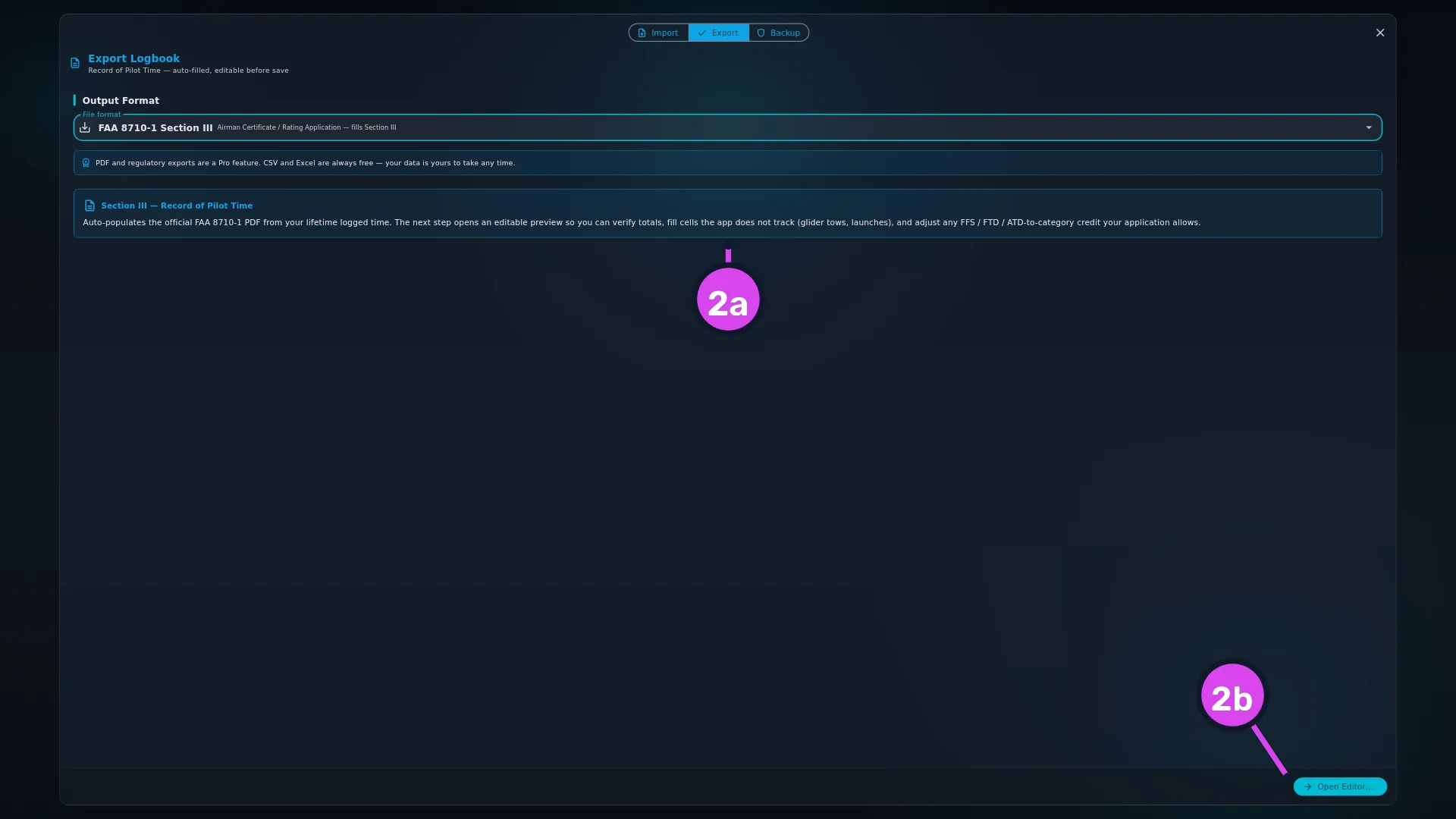
- Tap Open Editor…. It replaces Export as the main button, and the usual sections are replaced by one card headed Section III — Record of Pilot Time.
- When the editor opens, titled FAA 8710-1 · Section III, check the banner at
the top. It tells you which cells are yours to fill: Hours auto-populated to
one decimal from your logged time. Edit any cell to override — useful for
glider aero-tows / launches (not tracked in the app) and any FFS / FTD / ATD
time you wish to credit toward category totals per the regulation you are
applying under.
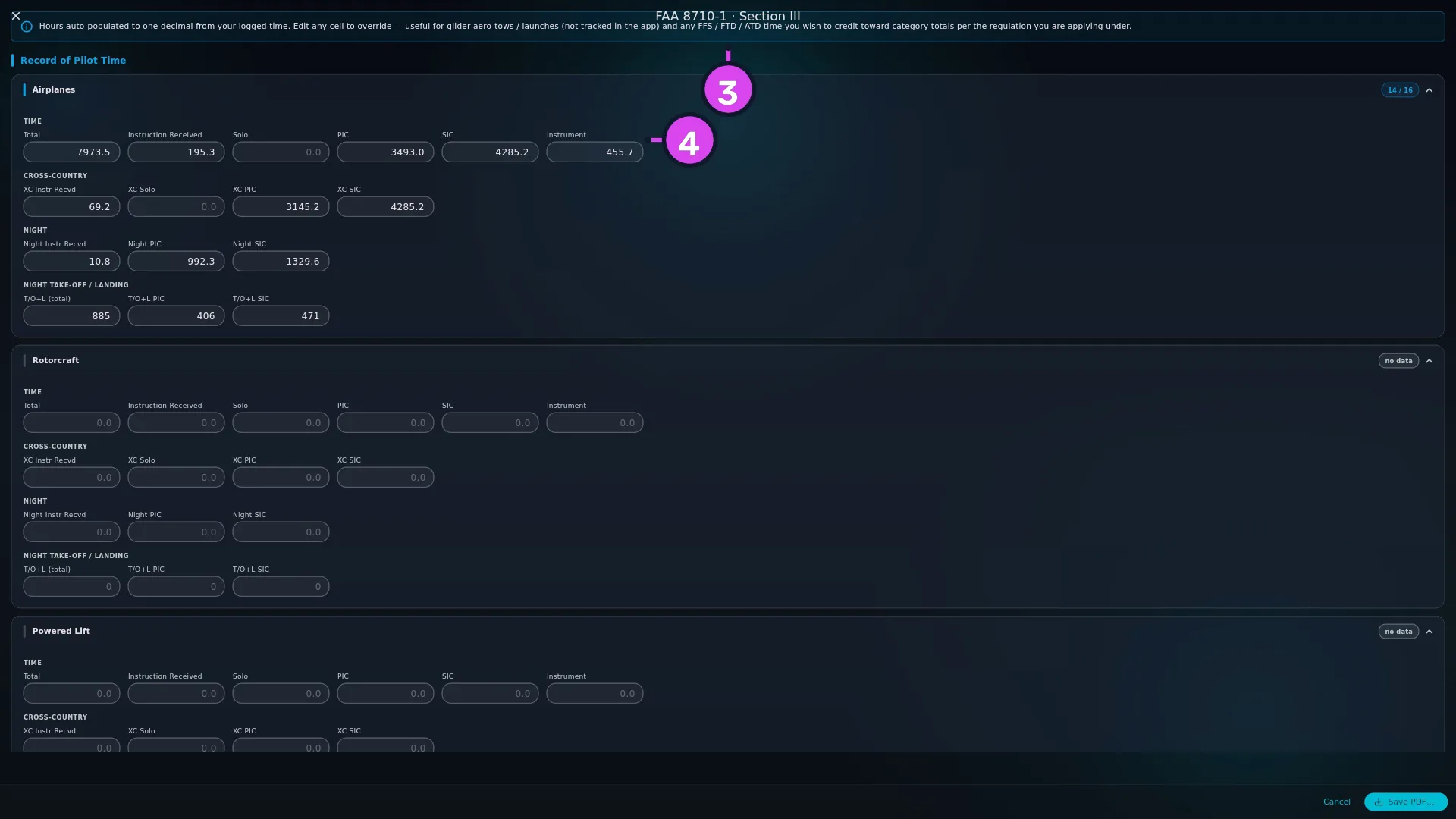
3 the banner saying the cells are auto-filled but editable4 the Airplanes Time group - Work down the Record of Pilot Time section, correcting any cell that’s wrong. It has eight row cards — Airplanes, Rotorcraft, Powered Lift, Gliders, Lighter-Than-Air, FFS · Full Flight Simulator, FTD · Flight Training Device, ATD · Aviation Training Device — and they don’t all have the same cells (see Reference: the cells on each row card, below).
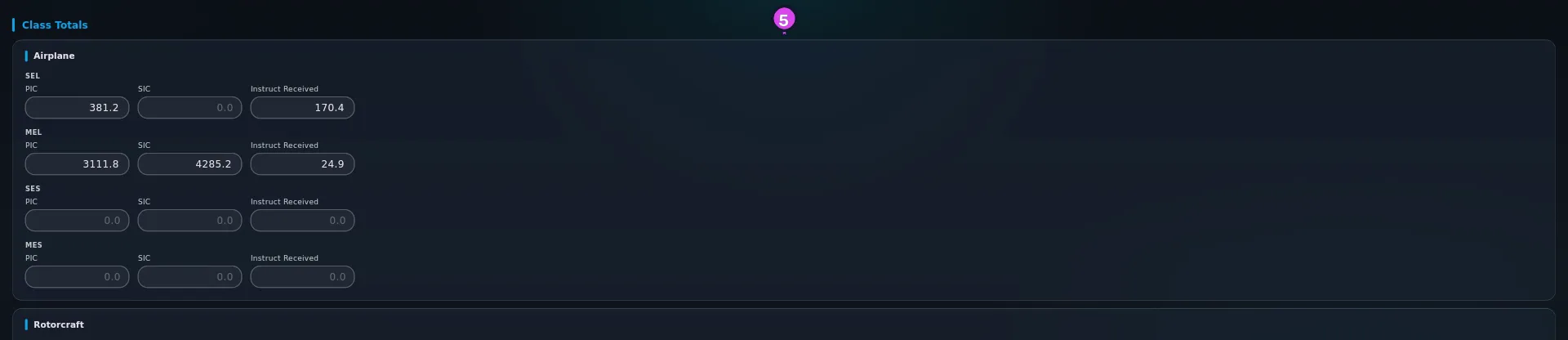
- Check the Class Totals section beneath it: six more cards — Airplane
(SEL, MEL, SES, MES, each against PIC, SIC and Instruct Received),
Rotorcraft (Helicopter, Gyroplane), Lighter-Than-Air (Balloon,
Airship), and one each for FFS, FTD and ATD (Single-Engine, Multi-Engine,
Helicopter).
- Type in the cells the app can’t know: glider Aero-Tows, Ground
Launches and Powered Launches, and the lighter-than-air equivalents.
Then tap Save PDF… and choose where to save. The name offered is
FAA_8710-1_YYYYMMDD.pdf.
How to tell it worked
The button goes back from Saving… and a message reads FAA 8710-1 saved. Open
the file: the Section III grid holds your figures, hours to one decimal, and
every cell you left at zero is blank rather than showing 0.0. Sections I, II
and IV are empty, which is expected.
If something goes wrong
| What you see | Why | What to do |
|---|---|---|
| The upgrade screen opens instead of the editor | This format is Pro, as is the PDF logbook | Upgrade, or use one of the four free formats (→ F3) |
| Could not load totals: … | Adding up your flights failed | Close the editor and open it again. If it keeps happening, note the message and report it (→ A11) |
| Save failed: … | The file couldn’t be written | Check you have free storage and can save to that folder, then try again |
| The Airplanes total is lower than your total time in the app | One or more flights are on an aircraft with no aircraft type set — or with a type whose category and class the form can’t place — and aren’t counted anywhere on this form. Simulator sessions aren’t airplane time either | Find and fix those aircraft (→ E2), then reopen the editor. See Gotchas |
| Your simulator session isn’t in Airplanes | It went to the FFS, FTD or ATD row, which is correct | Nothing to fix. Device time isn’t aircraft time |
| The glider launch cells are empty | The app doesn’t track aero-tows or launches | Type them in. That’s why the banner names them |
| A number was wrong and you corrected it in the editor | Corrections in the editor go onto the form only | Correct the logbook as well, or the next export is wrong again |
| Night take-off and landing cells look low | They’re counted as pairs, not as a sum of take-offs and landings | See Gotchas |
Reference: the cells on each row card
| Row card | Cell groups |
|---|---|
| Airplanes, Rotorcraft, Powered Lift | Time, Cross-Country, Night, Night Take-Off / Landing |
| Gliders | Time, Cross-Country (XC Instr Recvd and XC Solo only), Flights & Launches — no night cells at all |
| Lighter-Than-Air | Time, Cross-Country, Night, Night Take-Off / Landing, Flights & Launches |
| FFS · Full Flight Simulator | Time, Night, Night Take-Off / Landing |
| FTD · Flight Training Device | Time, Night |
| ATD · Aviation Training Device | Time |
They differ because the form doesn’t ask for the same cells on every row. Every cell is editable. Hours take one decimal, counts are whole numbers, and a zero is left blank.
Reference: where every filled cell comes from
All sums are lifetime, over every flight that isn’t deleted or a draft.
| Cell | Source |
|---|---|
| Which row a flight lands in | The session’s own device class, checked first — set FFS, FTD or ATD on the flight and it goes straight to that row, even with no aircraft type. Without one, the aircraft type’s device class, then its category, then its class, choose Airplanes / Rotorcraft / Powered Lift / Gliders / Lighter-Than-Air. A flight with no declared class and no aircraft type is dropped |
| Total | The sum of flight hours |
| PIC / SIC / Solo | The sum of PIC / SIC / solo hours |
| Instruction Received | The sum of dual received |
| XC PIC, XC SIC, XC Solo, XC Instr Recvd | For each flight, the smaller of its cross-country hours and that role’s hours, summed |
| Instrument | Actual instrument plus simulated instrument |
| Night PIC, Night SIC, Night Instr Recvd | For each flight, the smaller of its night hours and that role’s hours, summed |
| T/O+L (total) | Night take-off and landing pairs — the smaller of night take-offs and night landings; night landings alone where take-offs were never logged |
| T/O+L PIC / T/O+L SIC | The same pairs, attributed to whichever role logged more hours on that flight. PIC wins a tie. A flight logged only as dual received goes to neither, and appears only in the total |
| FFS Night and T/O+L, FTD Night | PIC and SIC added together — the form combines the two on device rows. FTD has no T/O+L cells and ATD has no night cells, so those figures don’t appear there at all |
| Airplane class totals — SEL, MEL, SES, MES | The aircraft type’s class exactly, against PIC, SIC and dual received |
| Rotorcraft Helicopter / Gyroplane | The type’s class, falling back to its category, against the flight’s total |
| LTA Balloon / Airship | The type’s class only — a balloon whose class is blank lands in the Lighter-Than-Air row but in neither class total |
| FFS / FTD / ATD Single-Engine, Multi-Engine, Helicopter | The class the device stands in for, against the session’s total |
| Gliders Flights PIC / Flights Dual | A count of glider flights carrying any PIC time / any dual time |
| Lighter-Than-Air Flights | A count of lighter-than-air flights |
| Aero-Tows, Ground Launches, Powered Launches | Never filled. Type them |
| Everything outside Section III | Never filled |
One rule applies across the table, for a flight that logs simulator hours
(simulator_hours in an export) but has no device class of its own: those hours
are added to the FTD row rather than kept in the aircraft’s own category, so
this form and the FTD column of the FAA logbook PDF agree. That only happens when
the real aircraft’s type matches one of the three device classes — single-engine,
multi-engine or helicopter. Sim hours logged against a glider, balloon or
powered-lift aircraft reach neither row, and the logbook PDF and this form then
disagree.
Instrument ground hours are left out here — they belong to the Ground column of the TCCA and CAANZ logbook layouts, not to a device row.
Gotchas
A flight whose aircraft has no aircraft type, and which declares no device class of its own, isn’t counted anywhere on this form. Not in a category row, not in a class total, not in a launch count. The same happens to a flight whose type is set but whose category and class match none of the form’s rows. (A flight with no type that does declare its own device class still reaches its device row’s Total — only the matching class column stays empty, since there’s no type to read a class from.) There’s no message, no count of skipped flights and no warning in the editor: the totals are lower than the truth, and nothing on screen says so. It’s the most serious silent gap in this area, on the one document where it matters most. Before you file, compare Airplanes → Total with the total time the app shows you. If they disagree, look for aircraft with no type set (→ E2), fix them, and reopen the editor.
What sends a session to a device row is the class you set on it, checked before the aircraft type. The entry form’s Simulator / FTD block pairs its hours with a device-class picker (→ E4): set FFS, FTD or ATD there on a flight logged against a real registration, and the whole session moves to that row here, out of every aircraft category. A session with no class of its own uses the aircraft type’s class instead — so a session flown on a type marked FFS still lands in FFS even when nothing was set in that flight’s own Simulator / FTD block.
Previous Experience is counted here — the opposite of what the CSV does. Your opening balance lands in the row for the category you entered it under, and in the matching class total. Enter it as MEL and it’s airplane multi-engine land time on this form (→ B7).
Night take-offs and landings are pairs, and they belong to a role. Six night take-offs and six night landings are six pairs, not twelve. And each pair goes to whichever role logged more hours on that flight — so a night circuit flown entirely as dual received appears in the plain T/O+L cell and under neither PIC nor SIC. That’s correct for a federal form, and it looks like a missing number if you weren’t expecting it.
Check the categories before you sign. Every row and class total is worked out from each aircraft type’s category and class. In a logbook that came in by import, those types are only as good as what the import matched them to (→ E3). A type matched to the wrong class puts real hours in the wrong column, and the column will look perfectly believable.
Edits in the editor don’t go back into your logbook. The editor is for correcting the form. If a figure is wrong because the logbook is wrong, fix the logbook — otherwise every future export repeats the error, and the form and your logbook disagree.
The app reports what you logged, and doesn’t advise. It doesn’t tell you what may be claimed, what counts toward a rating, or how much device time is creditable — that’s the regulation you’re applying under, and your instructor or examiner. For what the FAA asks a pilot’s log to record, see FAA pilot logbook requirements (14 CFR 61.51) in the library.
Worked example
A pilot with 900.0 hours in real airplanes, all single-engine land: 820.0 as PIC and 80.0 as instruction received. On top of that, 40.0 hours in a Level D 737 full flight simulator (an aircraft type marked FFS, multi-engine), 12.0 hours in a desktop ATD (standing in for single-engine), and 60.0 hours of Previous Experience entered under MEL.
Those three things land in four places:
| Cell | Reads | Why |
|---|---|---|
| Airplanes → Total | 960.0 | The 900.0 flown, plus the 60.0 opening balance. Neither device session is here |
| Class Totals → Airplane → MEL | 60.0 | The opening balance, in the class it was entered under, in the role columns it was entered against |
| FFS · Full Flight Simulator → Total | 40.0 | The type is marked FFS, so the whole session goes to the device row |
| ATD · Aviation Training Device → Total | 12.0 | Same rule, different device class |
The FFS class totals show 40.0 under Multi-Engine; the ATD class totals show 12.0 under Single-Engine; the Airplane class totals show 820.0 SEL PIC and 80.0 SEL Instruct Received alongside the 60.0 MEL.
The number the two device blocks do not change is Airplanes → Total. It reads 960.0 with the simulator and the ATD in the logbook, and 960.0 without them, because a device session isn’t aircraft time. Whether any of those 52.0 device hours may be credited toward a category total on your application is a question for the regulation you’re applying under; the banner says so, and the cells are editable so that you can act on the answer.