
What round-trips and what doesn’t
In one line
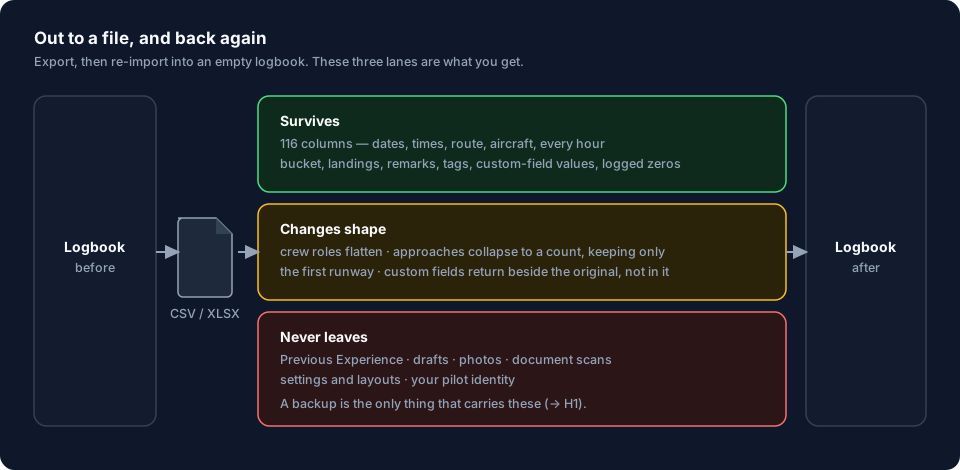
The CSV is your logbook’s way out — every one of its 116 columns is one the import wizard already reads — but what it carries is your flights, not your logbook.
Why it works this way
The export and the import are built from one list of columns. The export writes what the list says and the import reads the same list, so neither can stop carrying a field without the other. That matters because a missing column fails silently: a column that isn’t in the file looks exactly like a field you never filled in. The app is tested by sending a fully filled-in flight out and back in, and the test fails if either side drops anything.
What this means for you
- Nearly everything about a flight survives. Times, all 22 time totals, the specialised-operations hours, your declared device class and whether the session was supervised, every operational count, approaches, external loads, duty and rest, schedule, fuel, tags, remarks, custom-field values, and the operator and owner as they were recorded on the day of the flight.
- Crew survives as ten named roles, one person each — PIC, SIC, Relief, Instructor, Student, Student PIC, Examiner, P1US, Flight Engineer, Observer. A flight with two people in the same role exports one of them. So if you fly augmented crews, the second PIC is the thing to check.
- A flight with several approaches exports as a summary and splits back into
one approach per type. The type summary —
2x ILS; RNAV— returns as two approaches,ILSwith a count of 2 andRNAVwith a count of 1, each matched to a recognised approach type rather than brought back as the summary text. What the summary can’t carry back is which approach was which: different runways are joined together on the way out (27L; 09) and only the first comes back, and the same goes for the category — only the first approach’s category is exported, so it’s the only one that comes back. - Custom fields come back as new fields. The value survives; the name
doesn’t. A field you called My Note exports as the column
custom_my_noteand returns as a field named LogTen Custom_my_note, sitting beside the original rather than filling it in. Merge the two yourself afterwards, or expect a duplicate. - A zero you logged survives. No day landings on a night sector, a box you
unticked — a real
0orfalseexports as0orfalse, not as a blank cell. Only a field you never touched exports blank, and only a blank cell reads back as not recorded. - Airports export as the best code they have. The export tries the ICAO code first, then IATA, then the GPS code, then the local code — the same order the import checks them in — so an IATA-only or local-only airfield still comes back. The same fallback covers a diverted flight’s original destination column. Only an airport with none of the four codes exports blank.
- A re-import creates new flights. Nothing in the file says which flight in the app each line came from, so the import can’t recognise one it has seen before.
- What isn’t in the file at all: your Previous Experience opening balance, your drafts, photos and flight memories, documents and their scans, your currency settings, your layouts, your PIN, and the logbook’s own identity.
| Field group | Comes back? | What to know |
|---|---|---|
| Date, registration, fleet number, aircraft type | yes | The date is required on the way back in, and so is a registration or a fleet number |
| Departure, arrival, original destination | yes | Exported as ICAO, falling back to IATA, then GPS code, then local code — whichever the airport actually has. Only an airport with none of the four exports blank |
| Operator, owner | yes | As recorded on the day of the flight, not the aircraft’s current organization |
| Route, flight number, remarks, distance | yes | Distance is worked out by the app anyway |
| Operating under, operating context code | yes | The context code is what turns your currency rules back on. Without it, an imported logbook has none |
| Time basis | yes | Without it, a re-import assumes UTC and can work out block time wrongly |
| All 22 time totals, all 8 specialised-ops hours | yes | A real zero survives as 0. Only an unrecorded field exports blank |
| The session’s own device class, and whether it was supervised | yes | Beside the Simulator / FTD hours field on the entry form — setting a class is what moves a session to a device row on the FAA 8710 (→ F5) |
| Out / off / on / in, duty, schedule, pushback, taxi | yes | Exported as local HH:mm; the date is the flight’s own date |
| Tach start, tach end | yes | — |
| All 19 operational-stats columns — counts, the oceanic and ETOPS flags, launch flags, acres, pesticide name | yes | A real zero or a box you unticked survives. Only an unrecorded field exports blank |
| Approach count and type summary | yes | Splits back into one approach per recognised type, with the summary’s Nx as that type’s count |
| Approach runway | partial | Different runways are joined on export; the import keeps the first |
| Approach category | partial | Only the first approach’s category is exported; the others are dropped on the way out |
| Autoland, circle-to-land | yes | Combined into one tick for the whole flight |
| External loads, fuel, sectors, rest, augmented, acclimated | yes | — |
| The ten crew name columns | yes | One person per role. A second PIC on one flight is lost |
| Tags | yes | Joined with commas, then split again, lowercased, trimmed and de-duplicated. A tag containing a comma comes back as two tags, and one longer than 30 characters is dropped |
| Custom fields | partial | The value survives; the field returns renamed, as a new field |
| The flight’s own identity | not exported | Nothing identifies the flight, so every line arrives as a new flight |
| The sync stamp | not exported | It belongs to sync, not to a spreadsheet |
| Previous Experience | not exported | Left out so it can’t re-import as a fake flight |
| Drafts | not exported | Finish them first if you want them in the file (→ C3) |
| Photos, attachments, documents, scans | not exported | No format carries them |
| Settings, layouts, currency configuration, PIN, profile identity | not exported | That’s a backup, and it’s Area H |
The common mistake
Using a CSV to move a logbook to a new device.
The flights arrive, which is what makes it convincing. What doesn’t arrive is the opening balance, the photos, the documents, the settings, the layouts — and, most important, the profile’s own identity. Two devices sync because they share that identity, so a logbook carried over as a spreadsheet can never sync with the one it came from. Neither device tells you so: each reports finding no peers, which looks exactly like a Wi-Fi problem (→ A2).
Instead, send the profile across (→ I2, I3) or restore a backup (→ H6). Both keep the identity.
The second version of the same mistake is exporting a CSV, editing it, and importing it back into the logbook it came from, expecting the edits to land on the original flights. Nothing in the file says which flight each line came from, so every line arrives as a new flight and every one of them goes to duplicate review. Edit flights in the app, or edit several at once (→ C8) — the export is a copy, not a window.
Where to go next
- Making the file: Export CSV, TSV or Excel
- Bringing one back in: Import a CSV or Excel logbook and Column mapping (→ B2, B3)
- Actually backing up a logbook: How backups work here (→ H1)
- Actually moving a logbook to another device: How cloud-less sync works (→ I1)