
HUD configuration
What this does
Records which crew seats of one aircraft have a head-up display, and turns the hours that earns into a number you can see.
Before you start
- A profile is open, and the aircraft is already in your Hangar (→ E2).
- Setting this changes past flights as well as future ones. The figure is worked out from the aircraft’s current configuration, so recording a retrofit back-credits every hour you’ve ever flown on that tail.
Steps
- On Aircraft Hangar, tap the aircraft’s card to open its detail view, then tap Edit.
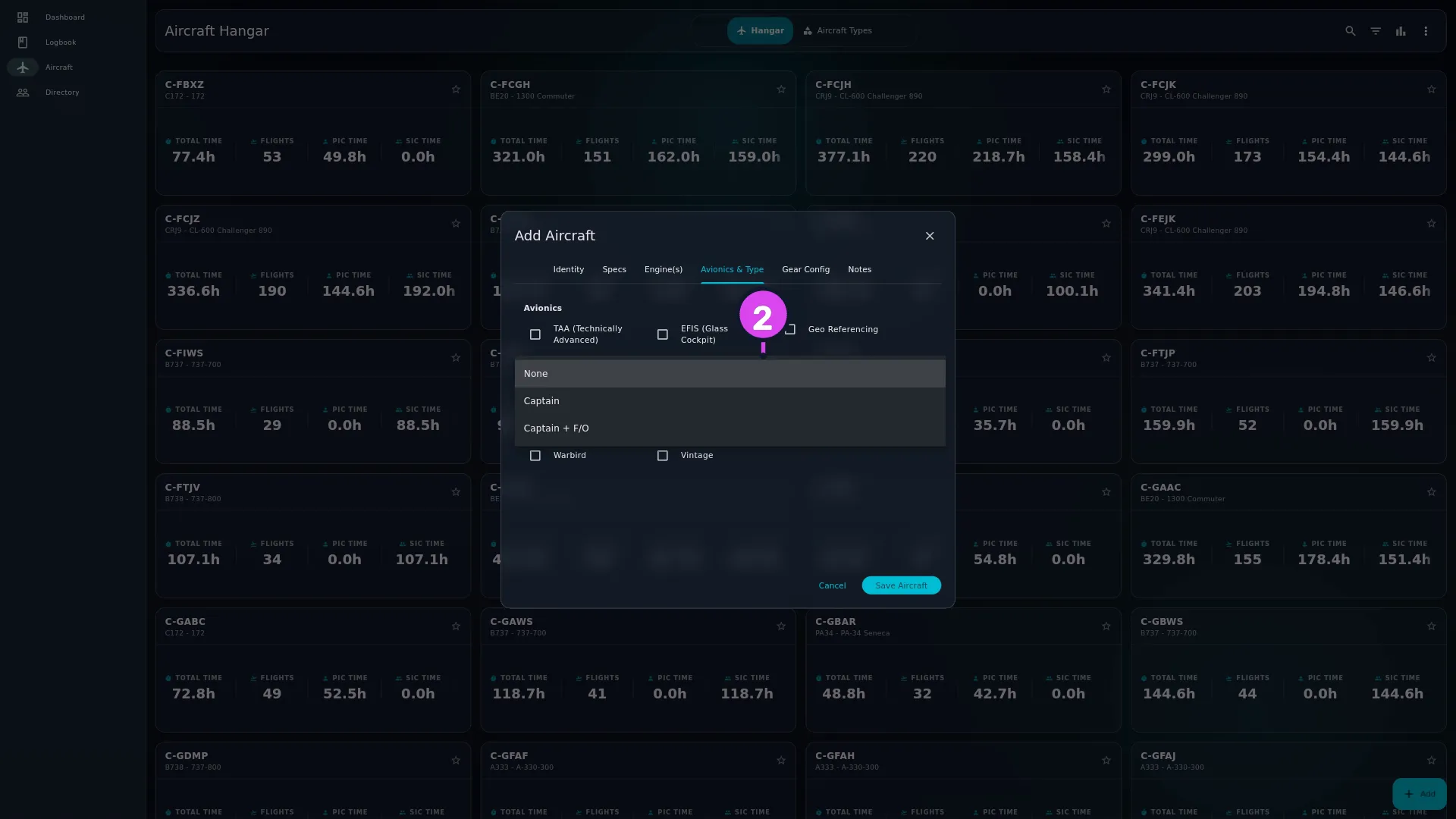
- Go to the Avionics & Type tab and set HUD Configuration: None,
Captain where only the left seat has a head-up display, or Captain +
F/O where both seats do.
- Tap Update Aircraft.
- Add the HUD Time metric wherever you want to read it — it’s off in every layout until you do. It sits under the category Flight Times in the dashboard stats-bar customiser (→ D2) and the flight-card customiser (→ D3). To see the setting itself on the Hangar card, add the identity field HUD in the Aircraft Card customiser (→ E1).
How to tell it worked
The aircraft’s card shows a HUD row reading Captain or Captain + F/O, and HUD Time is showing hours on the dashboard or the flight card you added it to.
If something goes wrong
| What you see | Why | What to do |
|---|---|---|
| No HUD row on the aircraft card | Either the configuration is None, which hides the row, or the HUD identity field isn’t on the card | Check the aircraft’s Avionics & Type tab, then the Aircraft Card customiser |
| HUD Time is nowhere to be found | The metric isn’t on any layout | Add it from the customiser, category Flight Times |
| HUD Time is less than the time you flew | Correct. It counts by seat and by role — see below | Nothing |
| A flight where you sat right seat earned no HUD Time | The aircraft is set to Captain, so only the left seat is equipped | Nothing, if that’s the aircraft. If both seats have one, set Captain + F/O |
| The field is missing from a flight card that shows it elsewhere | A flight whose HUD Time works out to zero shows nothing rather than a zero | Nothing |
| A type edit didn’t change HUD on your tails | Correct. HUD is set per airframe, not per type, because two tails of the same model can differ. It’s the one field on the Avionics & Type tab a type edit leaves alone (→ E3) | Nothing |
| HUD Time changed on flights from years ago | Expected. The figure reads the aircraft’s current fit | Nothing, if the retrofit is real |
What HUD Time counts
The app doesn’t show this rule anywhere, so here it is:
| Aircraft set to | Your PIC hours | Your SIC hours |
|---|---|---|
| None | not counted | not counted |
| Captain | counted | not counted |
| Captain + F/O | counted | counted |
So HUD Time is your PIC hours on any equipped aircraft, plus your SIC hours only on the aircraft where the right seat has a display too. Sitting right seat in an aircraft with a captain-only HUD earns you nothing — the answer to the question this metric raises more often than any other.