
Choosing your authority and page format
What this does
Sets the three things that decide what a printed logbook page looks like, starting with whose column layout it uses.
The other two are what paper it’s laid out for, and what the handwriting in your own cells looks like.
Before you start
- The export panel is open, with Pilot Information filled in (→ F1). This guide covers the middle of the same panel.
- These three sections only appear when File format is PDF, which is a Pro feature. The four free formats — CSV, TSV, the all-entities ZIP and Excel — have no layout to choose (→ F3).
Steps
-
Under Logbook Format, open Authority / Format and choose one of six. Check it rather than assuming it: the panel picks the authority you already track currency against, but falls back to EASA without saying so when it can’t read that in time.
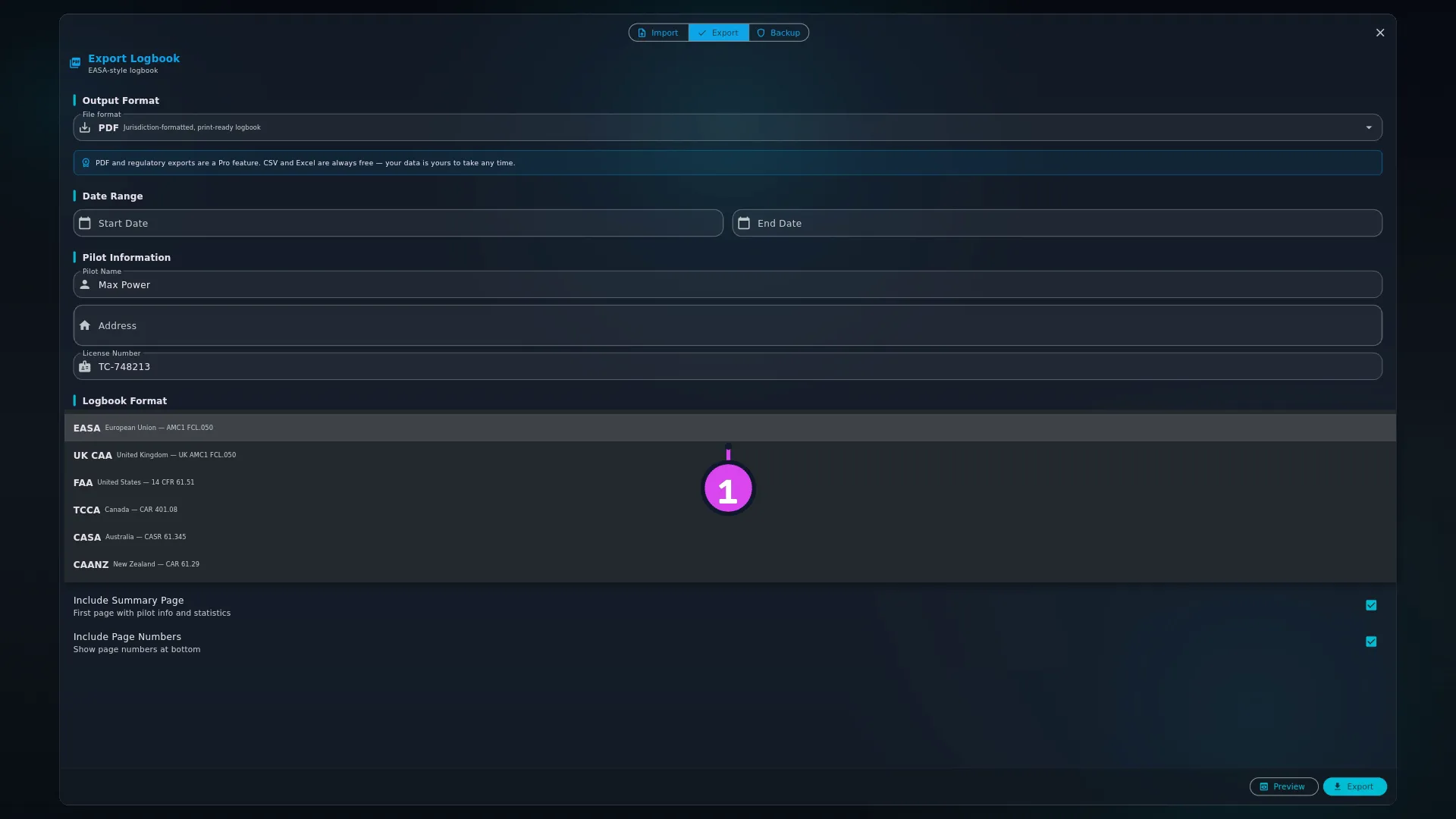
Entry Description shown EASA European Union — AMC1 FCL.050 UK CAA United Kingdom — UK AMC1 FCL.050 FAA United States — 14 CFR 61.51 TCCA Canada — CAR 401.08 CASA Australia — CASR 61.345 CAANZ New Zealand — CAR 61.29 -
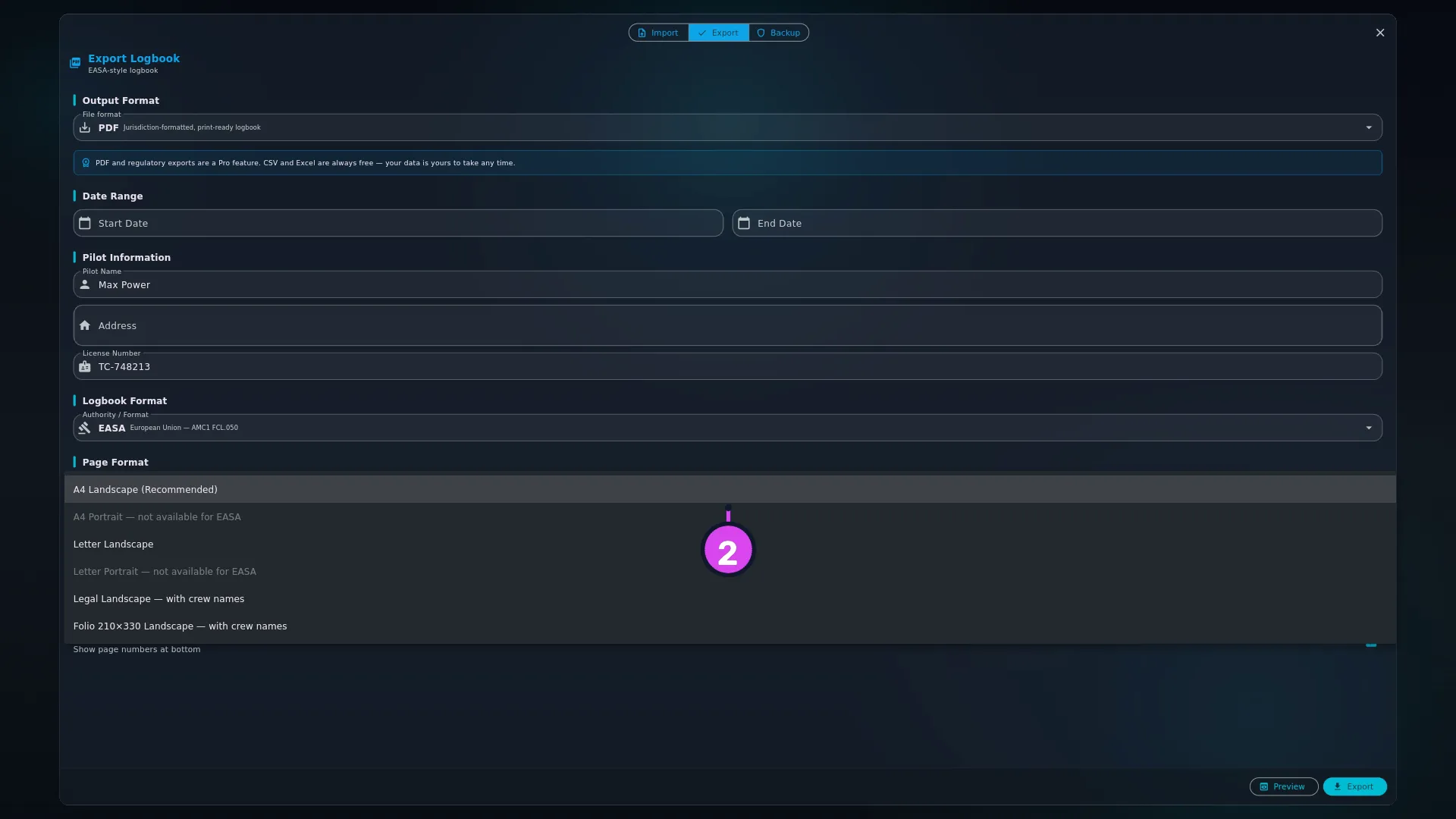
Under Page Format, open Paper Size & Orientation and choose one of six: A4 Landscape (Recommended), A4 Portrait, Letter Landscape, Letter Portrait, Legal Landscape — with crew names, or Folio 210×330 Landscape — with crew names. On the EASA, UK CAA, CASA and CAANZ layouts the two portrait entries are greyed out, each labelled ”— not available for [authority]” (see A note on portrait, below).
-
If you want crew names, choose one of the two extended sheets: Legal Landscape or Folio 210×330 Landscape. They’re the only two that add PIC Name and SIC Name columns.
-
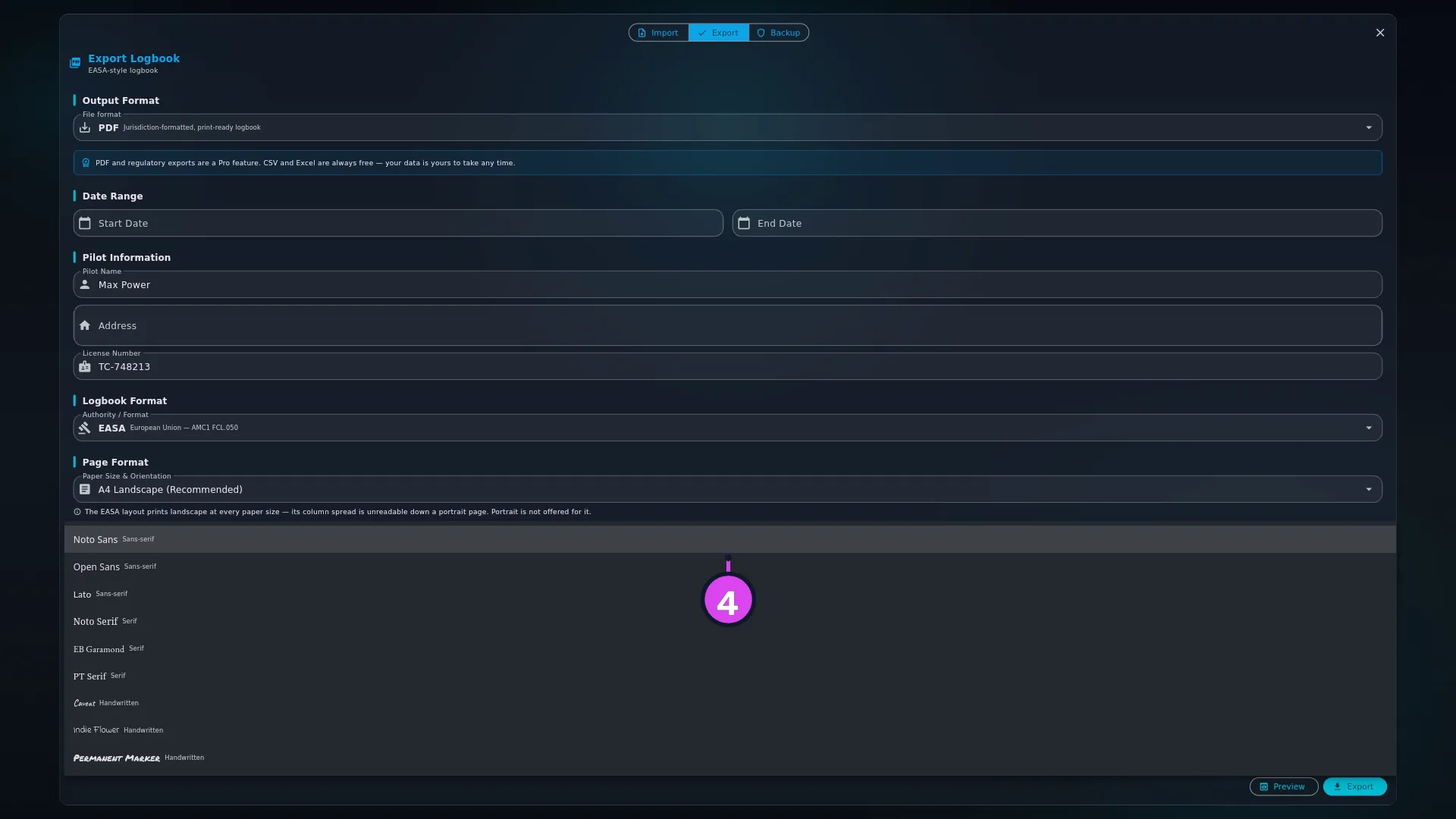
Open Font and choose one of nine faces, grouped as Sans-serif (Noto Sans, Open Sans, Lato), Serif (Noto Serif, EB Garamond, PT Serif) and Handwritten (Caveat, Indie Flower, Permanent Marker). It applies to your own entries only; headings, banners and citations stay in a plain face.
How to tell it worked
Tap Preview and look at one flight page:
- The column group headings across the top match the authority you chose (see the table below).
- The page is the size and the way round you asked for — unless you chose portrait on a layout that forces landscape.
- On an extended sheet, a CREW NAMES heading sits above two extra columns before Remarks.
- The citation printed under the page, and on the summary page, is the one for that authority.
If something goes wrong
| What you see | Why | What to do |
|---|---|---|
| The authority is wrong when you open the panel | The panel picks the authority you track currency against, and falls back to EASA when that setting hasn’t loaded yet. It gives no sign either way | Set Authority / Format yourself each time, before exporting |
| A4 Portrait and Letter Portrait are greyed out | You’re on EASA, UK CAA, CASA or CAANZ, which force landscape — their columns don’t fit a portrait page | Choose FAA or TCCA if you need portrait |
| You had a portrait size selected and switching authority changed it | Switching to EASA, UK CAA, CASA or CAANZ while a portrait size was selected changes it to the same paper size, landscape — A4 Portrait becomes A4 Landscape, Letter Portrait becomes Letter Landscape | Nothing to fix. Choose a portrait size again if you switch back to FAA or TCCA |
| A seaplane, glider, balloon or powered-lift flight has no time under a named category on the FAA layout | Those categories share one column, headed Other — only ASEL, AMEL and Helo get their own | Nothing to fix. The flight’s duration is under Total and Other |
| Crew names are missing | You’re on A4 or Letter, and there’s no crew-name switch | Choose Legal Landscape — with crew names or Folio 210×330 Landscape — with crew names |
| A PIC or SIC figure has a small S or U after it | The figure includes time you logged as Student PIC or Solo (S), or as P1US (U). The page footer spells the letters out | Nothing to fix. See Hours in capacities a layout has no column for, below |
| Your Relief or F/E hours aren’t in any column | No layout prints them as pilot time. They’re noted at the start of Remarks instead, and totalled on the summary page | Nothing to fix |
What each layout prints
These layouts follow the columns of each country’s usual paper logbook. None of them is a certified or approved reproduction of an official form, and none claims to conform to a regulation: the citation printed on the page names the rule a pilot logbook is kept under, nothing more. For what one of those rules actually asks of a pilot’s log, see Transport Canada pilot logbook requirements, FAA pilot logbook requirements (14 CFR 61.51), EASA pilot logbook requirements (Part-FCL FCL.050) or UK CAA pilot logbook requirements in the library.
| Authority | Column group headings across the page | Worth knowing |
|---|---|---|
| EASA | DATE · DEPARTURE · ARRIVAL · AIRCRAFT · SINGLE · MULTI · TOTAL · PIC NAME · LANDINGS · OP. COND. · PILOT FUNCTION TIME · FSTD SESSION · REMARKS | Has a Total column, and an FSTD SESSION pair — device class and session length — which is the regulation’s own column 11. Forces landscape |
| UK CAA | The same headings as EASA | The CAA’s own AMC1 FCL.050 sets out the same 12-column page, so the columns match EASA’s. The footer and summary page say UK CAA. Forces landscape |
| FAA | AIRCRAFT · ROUTE · LANDINGS · CATEGORY TIME · CONDITIONS · APPR · DUAL · PILOT TIME · REMARKS | Has a Total column, and dedicated category-time columns for ASEL, AMEL, Helo and FTD only — everything else (seaplane, glider, powered-lift, lighter-than-air) shares one Other column. Honours portrait |
| TCCA | IDENTIFICATION · SE · ME · PILOT TIME · XC · INSTRUMENT · REMARKS | Has a Ground column, which is where simulator time lands. Honours portrait |
| CASA | AIRCRAFT · TAKE-OFF / LANDING · DAY / NIGHT · PILOT TIME · INSTR / EXAM · INSTRUMENT · APPR · REMARKS | Carries PICUS, and separate FI Ex / FE Ex columns. Forces landscape |
| CAANZ | AIRCRAFT · ROUTE · SINGLE-ENGINE · MULTI-ENGINE · INSTRUMENT · OTHER · LANDINGS · REMARKS | The widest split — day and night, dual and PIC, in each engine group. Has a Ground column. The CP (command practice) columns print blank for now. Forces landscape |
Hours in capacities a layout has no column for
You can log hours as Student PIC, P1US, Solo, Relief and F/E, and most layouts have no column headed with those names. Each layout prints them where that country’s rules count them. When it adds them to a column, it marks the figure with a letter so you can see where it came from:
- S — the figure includes solo or Student PIC time.
- U — the figure includes PIC under supervision (P1US) time.
When a layout has nowhere to count them, it notes them at the start of the
Remarks cell, like Relief 6.4, and totals them on the summary page. The
note is added when the page is printed. Your own remarks aren’t changed.
| Authority | Student PIC and Solo | P1US | Relief and F/E |
|---|---|---|---|
| EASA | In PIC, marked S. A Student PIC row starts Remarks with SPIC and the name of the instructor on the crew list | In PIC, marked U. Remarks starts with PICUS and the name of the PIC on the crew list | Noted in Remarks — relief as CRCP |
| UK CAA | As EASA | As EASA | Noted in Remarks as Relief. The UK text has no CRCP entry |
| FAA | Student PIC is in PIC, marked S, and in Solo. Solo on its own stays in Solo | In SIC, marked U — never PIC | Noted in Remarks |
| TCCA | In PIC, marked S | In PIC, marked U | Noted in Remarks |
| CASA | In PIC, marked S | Its own PICUS column | Noted in Remarks |
| CAANZ | In the PIC columns, marked S | Noted in Remarks. The CP (command practice) columns print blank | Noted in Remarks |
The summary page shows how much of the PIC total is solo or student time and how much is under supervision. On the TCCA layout, a separate block totals your P1US hours with their take-offs and landings.
No layout applies a credit ratio, such as counting half of PIC-under-supervision time. Your log records the time you flew. Credit is worked out when you apply for a licence.
A leg logged in two of these capacities, such as PIC and Solo on the same solo flight, is counted once. A figure never exceeds the leg’s flight time.
Choosing paper for crew names
Selecting either crew-name sheet shows the app’s own explanation: Adds PIC Name and SIC Name columns. Not required by any authority, but it evidences who you flew with — useful when instruction was given or a check ride flown. The A4 and Letter sizes print the strict column set instead.
Crew names need width, so the two sheets that carry them are the two long ones. Legal is the Letter family’s long sheet, 8.5 × 14 inches. Folio 210×330 is the A4 family’s: the same 210 mm short edge as A4, with a longer long edge.
So if you print on European paper and want PIC Name and SIC Name, choose Folio, not Legal. Legal is 8.5 inches wide where A4 is 210 mm, so it won’t line up in a European binder or feed cleanly from a tray set for A4.
A note on portrait
A4 Portrait and Letter Portrait aren’t available on EASA, UK CAA, CASA and CAANZ. Those four layouts can’t be read at portrait width, so the dropdown greys the entries out, names the authority in the label, and shows a note underneath explaining why. Switching to one of those four authorities while a portrait size is selected changes it to the same paper size in landscape, so the export always matches what the dropdown shows. If you need a portrait logbook, use the FAA or TCCA layout.