
Forgotten PIN
What this does
Gets you back into a logbook whose PIN you can’t remember — or tells you plainly that you can’t, which is the answer more often than anybody would like.
Before you start
- Recovery only works if a Google or Apple account was attached to this profile before you lost the PIN, and only with that same account. A different one is refused.
- A successful recovery removes the PIN. It doesn’t tell you what it was. The profile opens unprotected, and you set a new PIN afterwards (→ A5).
- If there’s no account attached, go straight to If no recovery account is attached, below.
Steps
- On the profile selector, tap the profile’s card. The Unlock
dialog comes up. 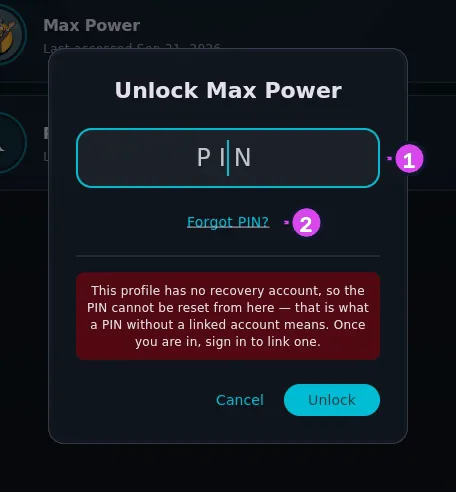
- Tap Forgot PIN?, underneath the PIN field.
- On the Recover PIN pane, tap Sign in with Google or Sign in with Apple — whichever account secured this profile.
- Complete your device’s sign-in.
How to tell it worked
A message reads PIN reset successful. and the logbook opens. The profile has no PIN now, so set a new one straight away. The app checks the PIN really was cleared before it shows that message. If clearing it fails, you get Could not reset your PIN. Please try again. instead, and the old PIN is still in place.
If something goes wrong
| What you see | Why | What to do |
|---|---|---|
| Account does not match profile owner. | You signed in with a different account from the one that secured this profile | Sign in with the original. The account can only be changed from inside the profile — Profile Settings → Security → PIN recovery account — so not without the PIN |
| Could not reset your PIN. Please try again. | The sign-in worked, but the PIN couldn’t be cleared | Try again. The recovery account is still attached and keeps working — only the reset itself failed |
| Sign-in closes and you’re back at the PIN field with no message | The sign-in was cancelled, or never completed | Tap Forgot PIN? again |
| Incorrect PIN | The PIN was wrong | The field clears itself. There’s no lockout after repeated attempts, so keep going if you think you’re close |
| A dialog headed This PIN cannot be typed on a phone | You typed the PIN correctly, and it “contains something other than digits”. It was set on a device with a hardware keyboard, before the app required digits | It isn’t a lockout, but a phone or tablet can’t unlock this profile. Do what the dialog says: “Change it now while you have a keyboard: Profile → Security → Change Profile PIN.” (The PIN field doesn’t filter out non-digit characters, so it never rejects the PIN itself) |
If no recovery account is attached
Tapping Forgot PIN? opens a dialog headed No recovery account on this profile. It tells you nothing can reset the PIN, because no Google or Apple account is linked to it — what the warning said when the PIN was set.
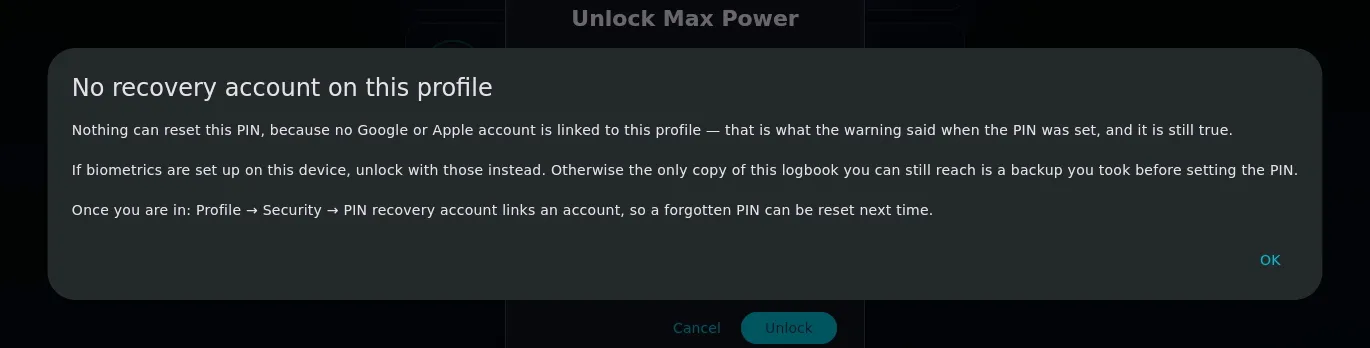
Take that literally. The logbook is encrypted on the device and there’s no copy on any server, so there’s nobody to appeal to — not the app, not us, not the device manufacturer. What’s left:
- Unlock with biometrics, if you set them up on this device (→ A6). Face ID or a fingerprint opens the profile without the PIN. Once inside, attach a recovery account and set a new PIN. This is the one route that works, and only on the device where the biometrics are enrolled.
- Keep trying the PIN. There’s no attempt limit and no lockout.
- Accept the loss. Deleting the profile (→ A10) and starting again is sometimes the honest answer.
A backup does not help here. The PIN is stored inside the logbook, so restoring a backup of this profile brings the PIN back with it. The backup passphrase and the profile PIN are different things, and one doesn’t get you past the other.
Attach a recovery account while you still know the PIN
You can’t attach a recovery account from this locked screen. If you could, anyone holding the device could attach their own account to your profile and reset its PIN. It happens only from inside an open profile:
Profile Settings → Security → PIN recovery account
Do that on every profile you care about, today. A profile you create while signed in is attached to that account automatically, so this mostly matters for older profiles, and for ones created offline.