
Delete a profile
What this does
Removes a logbook from this device — its flights, its documents and its media — permanently.
Before you start
- Back it up first (→ H4). There is no cloud copy. We hold nothing and can restore nothing.
- This cannot be undone. There’s no waiting period, and no bin to fish it out of.
- The profile has to be open. You delete the logbook you’re in.
- If this logbook is synced to another device, that device keeps its copy. Deleting here doesn’t delete there, and the two aren’t connected afterwards. To be rid of the logbook altogether, delete it on every device.
Steps
- On the dashboard, tap your profile card at the top to open Profile Settings.
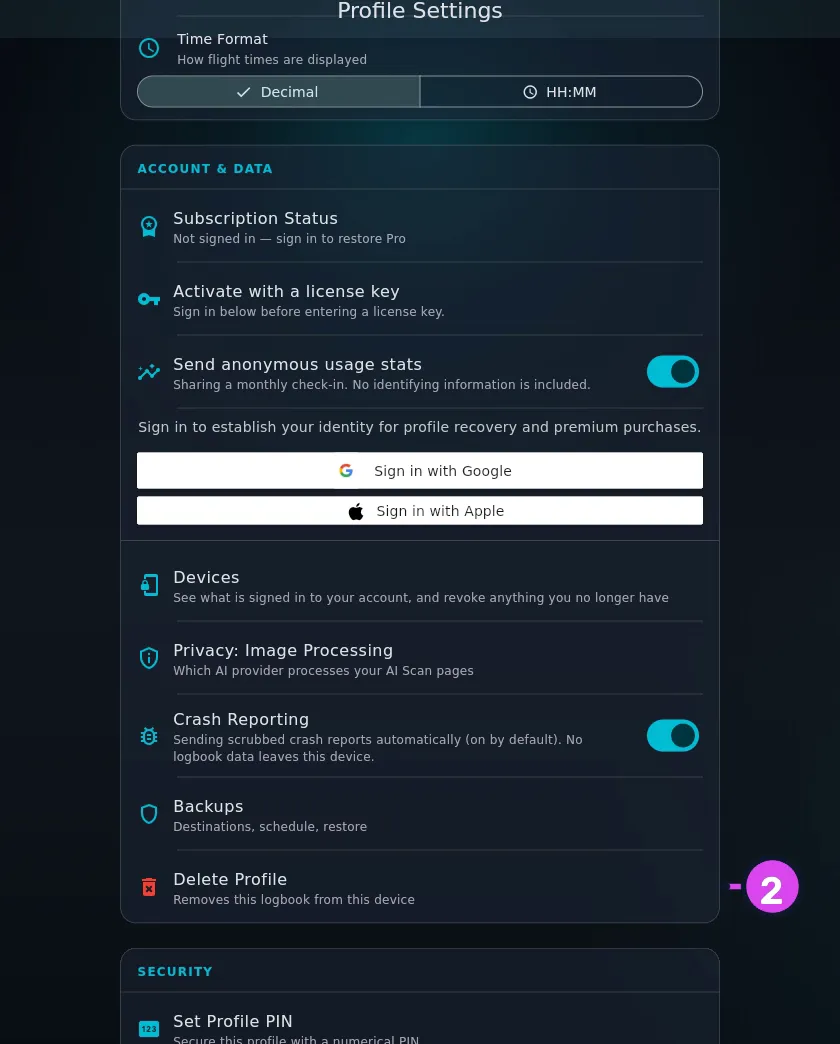
- Scroll down to ACCOUNT & DATA and tap Delete Profile — Removes this
logbook from this device, in red at the bottom of the section.
- Check the confirmation before you go on: This removes the logbook — flights,
documents, and media — from this device. We keep no cloud copy, so restore from
your own backup if you might need it later. This can’t be undone. It doesn’t
mention your other devices, which keep their copies.
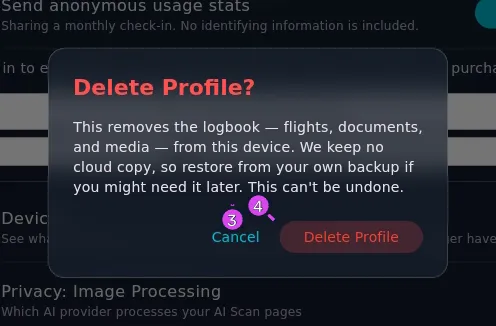
- Tap Delete Profile.
How to tell it worked
The settings screen closes and a loading panel appears for a moment. Then you’re on the profile selector, with that profile gone from the list. If it was your only one, the screen reads No profiles yet.
If something goes wrong
| What you see | Why | What to do |
|---|---|---|
| Could not finish deleting the profile — it is still on this device. Open it and try again, or restart the app if it keeps failing. | A file was still in use and couldn’t be removed | Do what it says. The profile stays in the list so you can retry, rather than be left with half of one |
| The profile is gone but a picture of you is still around | Profile pictures are kept in a shared folder outside the logbook, and are cleared up separately | Nothing to do. There’s no logbook data in them |
What “delete” means here, precisely
The logbook’s folder is removed from this device’s storage — the database file, the document scans, the flight photos — and the profile comes off the list. It’s an ordinary delete, like deleting any other file. It isn’t a secure wipe: someone with recovery tools and the device in hand could in principle pull fragments of it back. If you’re selling the device or handing it on, wipe the device itself rather than deleting profiles one at a time.
Your Google or Apple account isn’t affected by any of this, and neither is any Pro licence attached to it.