
Document history
What this does
Opens the older records behind a document — last year’s medical, the PPC before this one — with their dates and their scans.
Before you start
- You’re in the Document Store screen (→ G1). History isn’t shown on the dashboard strip.
- The document has more than one record. A document with a single record has no History expander at all, and that isn’t a fault.
- History is read-only. There’s no delete, no reorder, and no way to make an older record current again.
Steps
- Find the document’s card. At its foot is an expander reading History
(N), where N is the number of older records.
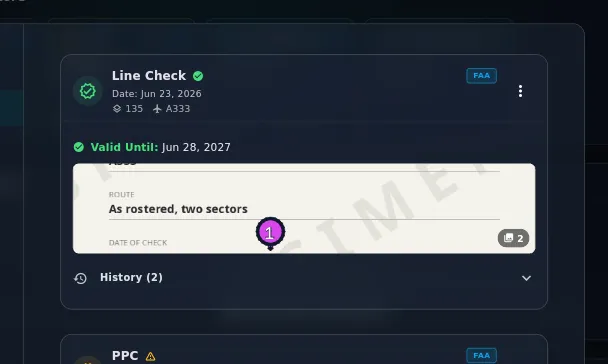
- Tap History (N) to open it.
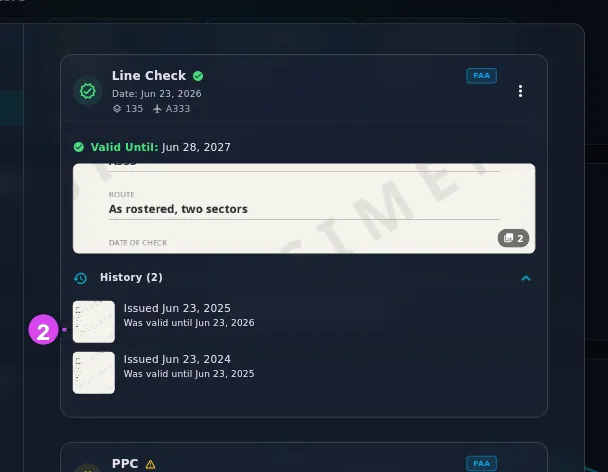
- Find the older record you want. Each row shows that record’s scan thumbnail, Issued with its date, Was valid until with the expiry it had, and any notes you wrote on it.
- Tap a thumbnail to open that record’s scan full screen.
- Tap History (N) again to collapse it.
How to tell it worked
The expander is open, with one row per older record, the oldest dates at the bottom. None of the rows is coloured.
If something goes wrong
| What you see | Why | What to do |
|---|---|---|
| No History expander | This document has only one record. A renewal that changed the authority, the subcategory or the aircraft type started a second document instead of adding to this one | Look for a second card of the same type (→ G3) |
| A thumbnail reads Syncing… | The scan’s image hasn’t arrived from your other device yet | Run a sync (→ I5). The record itself is already here |
| A history row has no thumbnail | No scan was attached to that record | Nothing to fix. You can’t add scans to a past record; they belong to the record they were filed with |
| The count or the top row looks wrong after a deletion | See the last section | Check it before you trust the list |
Why nothing in history is red
The newest record in a document is the one that counts, and every older one becomes history rather than an alarm — the app calls this supersession. A medical that expired in 2023 and was renewed in 2024 isn’t a problem, so history rows are plain: no colour, no icon, no expiry warning.
The scans in a history row are the ones attached to that record. They aren’t carried forward to the current one, which is why each renewal needs its own (→ G3).
History is per document, and a document is narrower than you might think
Two type ratings on two aircraft are two documents with two separate histories, because the aircraft type is part of what identifies a document. The same goes for the same check filed under two different parts, or issued by two different authorities. If you expected one history and found two, that’s usually why.
After deleting the newest record, the list misreports
Delete the newest record in a document and History stops being accurate. The card falls back to showing the record below it, which is correct. But the history list then shows that same record again, as its own history, and the record you deleted disappears from the list. The count is wrong too.
Reloading the app doesn’t fix it. To see a document’s real sequence after deleting from it, go by the dates on the cards, not the history count. The struck-through Deleted record is still in the Document Store list, even though history no longer mentions it.