
Import history and undo
What this does
Reverses an import that went wrong, and shows you the original source row behind any imported flight.
Before you start
- Undo from the device that did the import. Import history stays on the device that ran the wizard and doesn’t travel over sync. A device that only received the flights has no history for them and can’t undo the import — it gets the removal once you undo on the right device.
- Undo is one whole session at a time. There’s no partial undo, no way to pick rows, and no redo.
- Undo doesn’t remove everything a logbook import created. The aircraft, airports and people it added stay in your Hangar and Directory. Read What undo removes, and what it leaves before you rely on undo for a clean slate.
Steps
- On the dashboard, tap the Import / Export / Backup card, choose Import, then tap Import History.
- Find the session in the list, newest first. Each one shows the file name, the
date and time, and a record count. A session that’s already been undone
carries a red Reverted chip where the button would be.
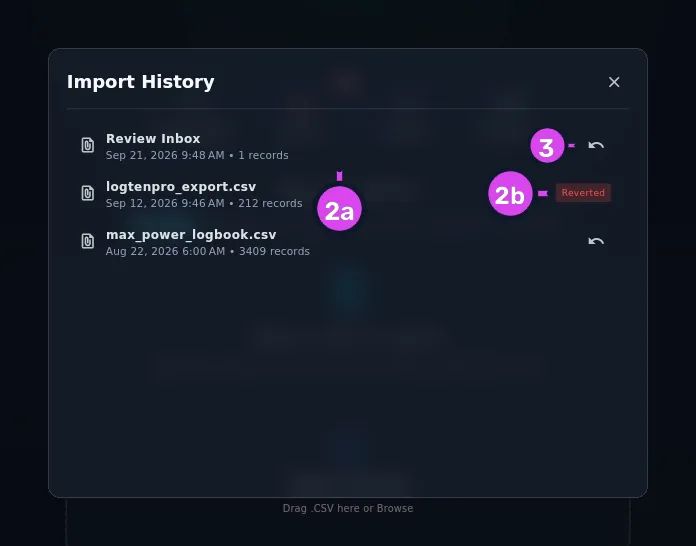
2a a row's date and time with its record count3 the undo button2b the Reverted chip - Tap the ↶ button (Undo Import) on the session you want to reverse.
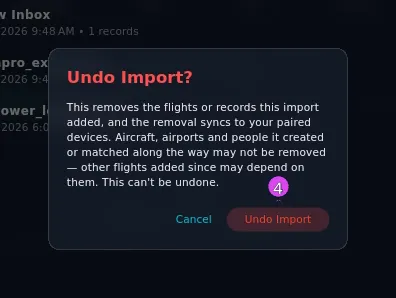
- In Undo Import?, tap Undo Import to confirm, or Cancel. The dialog
reads This removes the flights or records this import added, and the removal
syncs to your paired devices. Aircraft, airports and people it created or
matched along the way may not be removed — other flights added since may
depend on them. This can’t be undone.
- To see where a single flight came from instead, open it from your logbook and
tap Source in its action row. The button only appears on flights that came
from an import.

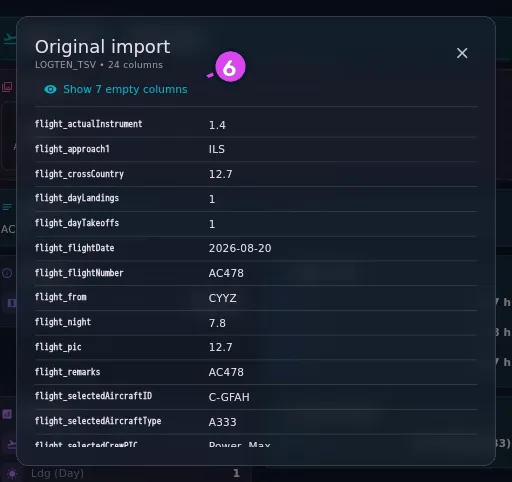
- The Original import dialog shows every column of the source row exactly as
the file held it, including columns nothing was mapped to. Tap Show N empty
columns to see the blanks too.
How to tell it worked
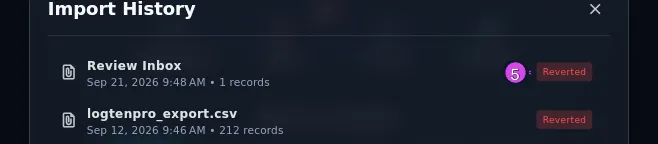
A message reads Import reverted successfully, and the session’s undo button is replaced by a Reverted chip.
Open your logbook and the flights from that import are gone. Your Hangar and Directory are a different matter — see below.
If something goes wrong
| What you see | Why | What to do |
|---|---|---|
| No import history found | This device hasn’t run any imports, or you’re on a device that received the flights over sync | Undo on the device that did the import |
| Undo failed: … | The removal couldn’t be saved | Try again. Nothing is left half-done in a way you can’t undo again |
| Error: … where the list should be | The history couldn’t be read | Close the dialog and open it again. Your logbook isn’t affected |
| No Source button on a flight | The flight was logged by hand rather than imported | Nothing to fix. Only imported flights have a kept source row — including ones committed one at a time from the Review inbox |
| No archived source for this record. / Only records imported since this feature shipped have one. | The flight was imported before the app kept source rows | Nothing to fix |
| No values in this row. | The kept row is empty | The source row itself held nothing but blanks |
What undo removes, and what it leaves
Undo removes the flights and everything attached to them: their times, crew, approaches, tags, duty and rest, schedule, fuel, external loads and attachments, along with the kept copies of the source rows.
It leaves behind:
- The aircraft, airports and people a logbook import created for you, in the great majority of cases. Undo an import that added 12 aircraft and 30 airports and you’ll usually still have all 42 in your Hangar and Directory, to remove by hand if you want them gone (→ E1, E6). Nothing records which import made them, and a later import may have gone on to use them. Records from an Aircraft, Types, People, Orgs or Airports import are different: those are the import’s own records, and undo does remove them.
- Every row from that session sitting in the Review inbox. They stay put (→ B5).
- Any custom fields the import created, so that a re-import lands in the same fields.
The confirmation hedges, and it’s right to. It says undo removes the flights or records the import added, but that the aircraft, airports and people it created or matched may not be removed — a later import may depend on one of them. It also isn’t permanent in the technical sense: removed flights are marked as deleted rather than erased, which is how the removal reaches your other devices.
“N records” is the number actually written
Once the import finishes, the count on a session is corrected to the number of rows it actually committed — not the file’s row count, and not the 10,000 cap. A 500-row file with 90 rows held for review reads 410 records, and a 14,000-row file reads how many of its first 10,000 rows were written, not 10,000.
Review inbox commits have their own history
A flight you commit one at a time from the Review inbox gets its own entry, filed as Review Inbox with one record, and its own Source button — the same as a flight that arrived through a full import.
AI Scan sessions and sync placeholders are not in this list
Scan sessions — this device’s own, or a placeholder a sync created for a scan taken on another device — don’t appear in Import History. Manage a scan from the Scans page instead (→ B9).