
Usage stats and crash reporting
What this does
Decides what diagnostic information leaves this device: a monthly anonymous check-in, and reports about errors the app hits.
Before you start
- A profile is open, because both settings are reached through Profile Settings — but neither belongs to the logbook. Both are per device, and both apply to every logbook on it.
- Both default to on. If you’ve never touched either, both are sending.
- Neither ever carries logbook data. No flights, no names, no account identity, no location.
Steps
- On the dashboard, tap your own profile card at the top to open Profile Settings, and scroll to ACCOUNT & DATA.
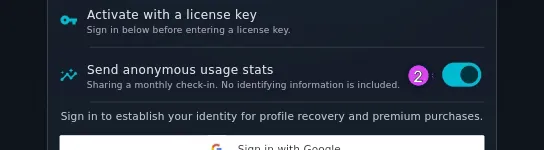
- Find Send anonymous usage stats and tap its switch, or the row itself, to
change it. The row shows its own state: Sharing a monthly check-in. No
identifying information is included. when it’s on, and Anonymous usage
stats are off for this device. when it’s off.
- In the same section, find Crash Reporting and tap its switch to change it
without leaving Profile Settings, or tap the row to open the full screen.
The row reads Sending scrubbed crash reports automatically (on by default).
No logbook data leaves this device. when it’s on, or Crash reporting is off
for this device. when it’s off.
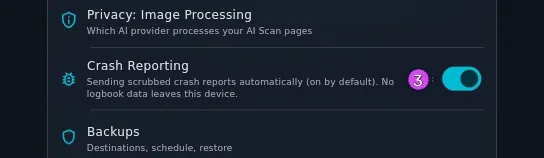
3 the switch that turns crash reporting on - On the Crash Reporting screen, the same setting appears as the Send crash reports switch — Automatically report crashes and errors so we can fix them. This is on by default during the beta — switch it off and nothing further leaves this device.
- Scroll to the What we collect card under the switch. It’s quoted in full below.
- If the screen offers Send test event, tap it to check reports get through. The confirmation reads Test event sent (if reporting is active). The button only appears on a build that has somewhere to send reports.
How to tell it worked
Both rows change their own subtitle the moment you flip them, and that’s the only confirmation either setting gives. The switch on the Crash Reporting screen keeps its position when you leave and come back, and always matches the row in Profile Settings. Turning either off shows no confirmation, and nothing more is sent.
If something goes wrong
| What you see | Why | What to do |
|---|---|---|
| This build has crash reporting disabled (no reporting endpoint is configured), so nothing is sent regardless of this setting. Your preference is still remembered. | This build has nowhere to send reports. That’s also why Send test event isn’t there | Nothing to do. Nothing is being sent, and your switch position is kept for a build that does send |
| You turned usage stats off and something still went out | Turning it off stops new events; events already waiting still go | Nothing to do. It applies from now on, and the queue is short |
| The settings came back on after restoring onto a new computer | Both are kept on the device, outside every logbook, so they aren’t in a backup | Set them again on the new machine |
| Another of your devices is set differently | Both settings are per device | Set each device the way you want it |
What the monthly check-in contains
Short enough to list in full:
| What | Example |
|---|---|
| A rotating monthly token | a 43-character value, fresh every calendar month |
| The calendar month | 2026-09 |
| Whether the licence is free or pro | free |
| The platform | android |
| The app version, to the month | 2026.9 |
| The month the licence was activated | 2026-04 |
Plus, the first time you use one of six features in a month, its name: QR pairing, P2P sync, export, multi-device use, AI Scan, FMC capture. One line per feature per month, with no detail about what you did with it.
The token changes every month and is made from your licence, so two months’ check-ins can’t be joined together into the history of one pilot. That’s what “anonymous” means here: how many people used the app in September can be answered, and what any one of them did across the year can’t.
What a crash report contains
Quoted from the screen: Only the technical details of a problem: the error, its stack trace, which part of the app it happened in, your platform, and the app version. Reports are scrubbed before they leave your device — no logbook data, no email or account identity, no location.
Note “a problem”, not “a crash”. Errors the app recovers from get reported too, and those don’t crash anything — a failed import, a change that couldn’t be saved, a screen that wouldn’t load. They’re the useful ones, because otherwise a pilot would have to notice them and describe them.
Because crash reporting is set per device and never per logbook, switching it off can’t be undone by a sync from another device, or by a restore.