
Is there a pilot logbook for Linux? The honest options
I’ve run Linux at home since 2017. Before that I’d been on a Mac since 2003, and my logbook lived in LogTen Pro until it moved to a subscription. I left it for a spreadsheet of my own making. So when I moved to Linux, the lack of a logbook there didn’t stop me. I’d already given up on logbook software.
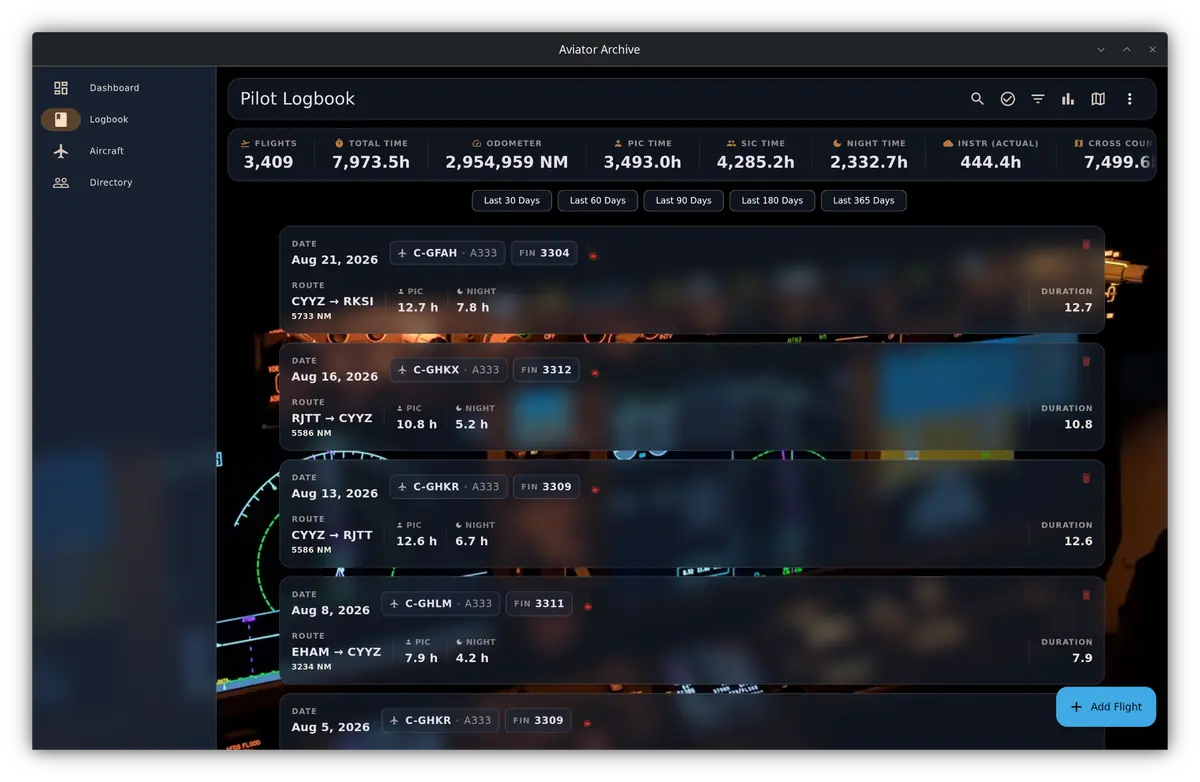
It’s a common story. Pilots on Linux have made do with a spreadsheet, a website, or a Windows program coaxed into running. Eventually I wrote my own, Aviator Archive, and it runs natively on Linux. This page covers every route I know of, including mine, and what each one costs you in effort.
Is there a pilot logbook app for Linux?
Very few, and none from the well-known commercial vendors. I checked the platforms each one lists on its own website (September 2026). LogTen runs on iPhone, iPad, Apple Watch and Mac. Logger runs on iPhone, iPad and Mac. Logbook Pro Desktop requires Windows, and its vendor says a Mac needs a Windows host such as Parallels or VMware to run it. Safelog runs on Windows, Mac, iPhone and iPad, Android and the web. CrewLounge PILOTLOG’s desktop app requires Windows; its FAQ says that since version 6 you can run its web application on Linux. None of them lists a Linux app.
Linux isn’t a rounding error, either. StatCounter puts it at about 9% of desktop web traffic worldwide in August 2026, against about 63% for Windows (StatCounter).
What are your options on Linux?
A web logbook. This is where most Linux pilots in the forums end up. MyFlightbook works from any browser and is free to use. ForeFlight Logbook has a web version, and so do Safelog and, per its vendor, CrewLounge PILOTLOG. The trade-off is that your logbook lives on someone else’s server, and printing goes through your browser.
A Windows logbook under Wine, or in a virtual machine. People have done it. A 2011 thread on NC Software’s own forum walks through installing Logbook Pro under Wine, with about ten extra Windows components to install first. In 2022, a user on the same forum pointed out that the last word in that thread was that reports didn’t work. The vendor’s supported route for a Mac is a Windows virtual machine. On Linux, I’d expect the same to be the more dependable choice, at a price: you’re running Windows, with a Windows licence, to keep one program alive. Which Windows logbooks are still current is in Pilot logbook software for Windows.
A spreadsheet. A spreadsheet will hold a logbook, and for years mine did. LibreOffice Calc comes with most Linux desktops. It costs nothing and it’s yours. It also does nothing for you: totals, currency and printed pages are all formulas you write and check yourself.
An open-source project. Two are worth knowing about. web-logbook is a program you run on your own machine and use through your browser, with builds for Linux. openPilotLog is a native desktop app, but its own page calls it “an early testing version” and says it’s “not recommended to use it as your primary logbook solution just yet.”
A native app. That’s the gap I set out to fill.
How do you install a pilot logbook on Mint, Ubuntu or Debian?
Mine is Aviator Archive, and it ships two ways on Linux, both from the download page.
The .deb package, for Linux Mint, Ubuntu, Debian and anything else that
uses apt. It needs a 64-bit Intel or AMD machine, and Ubuntu 22.04, Mint 21,
Debian 12 or LMDE 6, or newer. In the folder you saved it to, install it with
apt, not dpkg -i:
sudo apt install ./aviator-archive_amd64.debdpkg doesn’t install dependencies, and the one it would miss is the keyring
service the app needs to unlock your logbook. The package also adds its own
update source, so new versions arrive with your normal system updates.
The Snap, for Ubuntu:
sudo snap install aviator-archiveUse the .deb on Linux Mint instead: Mint disables the Snap Store by default (Linux Mint User Guide).
I run it on Debian with KDE and on Ubuntu with GNOME. A friend runs it on Mint. I haven’t tried a tiling window manager.
What works differently on Linux?
Most of the app is identical on every platform. On Linux, a few things differ:
- It needs a keyring. Your logbook is encrypted on disk, and the key is kept in your desktop’s keyring, through the Secret Service that GNOME Keyring and KWallet provide. The .deb brings GNOME Keyring along. On my KDE machine, GNOME Keyring provides it, with KWallet running alongside. A bare window manager with no keyring at all is untested.
- No camera, so paper pages come in as files. Scanning a paper logbook works from photos or PDF pages you pick from disk.
- A PIN, not a fingerprint. You can protect a logbook with a PIN, but there’s no fingerprint or face unlock on Linux.
- Screen scaling is in the app. GTK 3 has no fractional scaling, so on a high-density screen use the app’s own interface scale setting instead.
- Sign-in opens your browser behind the app window. If nothing seems to happen, look behind the app.
Can you get your data out of a Linux logbook?
This matters more on Linux than anywhere else, because the software landscape there has been thin and short-lived. A logbook has to outlast the program it’s kept in.
In my app, CSV and Excel export are free whether you pay or not, and a PDF of the logbook in a regulator’s layout is part of the one-time purchase. Backups go to a local folder or a WebDAV server. They run on a schedule while the app is open, and there’s no background service on Linux.
What I do, whatever the app: I keep two copies of my logbook, a backup in the app’s own format that can be restored, and a CSV export that any program can read. Both go to a cloud drive as well as my own disk, so there has always been a copy of my logbook somewhere I can reach it.
Before you pick any logbook, put these questions to it:
- Can I export every entry to CSV without paying?
- Can I print my logbook in my regulator’s layout?
- If the company closes, does the software still open my logbook?
- Does it work on the computer I actually use, and on my phone?
A logbook kept on a computer is a real logbook, as long as it holds what the rules ask for. The Canadian answer is in Are electronic logbooks legal in Canada?, and the FAA’s in Can an FAA logbook be electronic?.
A logbook should be with you for your whole career, so choose one you can own and take with you, not one you’ll be renting for 30 years.